


Hi there “Process Automation” fans,
Welcome to a new installment of “Process Automation” tips.
This post is inspired by a fascinating discussion I saw pass by at the OpenText Forum. It’s a special setting for a BPM (service call) activity to instruct which service container it needs to run on. So, if you have two service containers of type ‘UDDI’ (both with different configurations), you can tell your BPM activity which one to use to execute the request. #OMG; I thought I knew it all by now…However, new functions (after 365 posts) still pop up to the surface.
The post above shows an example via the ‘Email’ service container, but we want to raise the bar with two UDDI containers. This should be the same trick, but let’s see what we’ll face…
Let’s get right into it…
Just a quick brain dump from myself: If we create two UDDI services (including two service groups), they can have their own method sets. At method set level, we can already distinguish the “receiver” on service group level, simply by adding each method set to the corresponding service group. Agree, BUT this post (and also the forum post) uses only one method set! So, this service group trick does not work! We still can have two service groups, but both will use the same method set. AHA!
It’s time to start up our favorite VM with the OPA instance and dive into a nice new project with a corresponding workspace. We’ll create a new UDDI service (from the ‘System Resource Manager’ artifact) using our own post where we use this WSDL as the endpoint.
This post has a list of free external SOAP services
This post (in section ‘Low-code EIS Connector’) has a list of free external REST services (for what it’s worth for this post; now you have them all together!)
These are the quick steps:
- Create a new service container from the ‘System Resource Manager’ artifact
1a. Connector type:UDDI Service
1b. Group name:sg_uddi
1c. Select service interface:Method Set UDDI
1d. Service name:sc_uddi
1e. Startup automatically
1f. Assign to the OS Process - Create a new ‘Web Service’ type of document (like you also create a new entity)
2a. Source isImport WSDL
2b. Name:ws_country_info
2c. URL (accessible from your VM!):http://webservices.oorsprong.org/websamples.countryinfo/CountryInfoService.wso?WSDL
2d. Show the services and select them all. - In the properties of
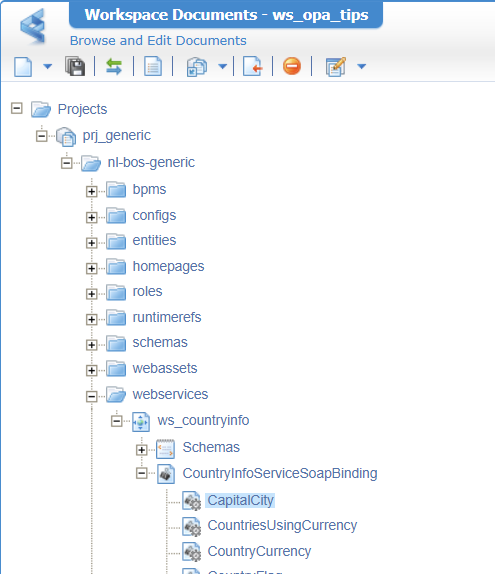
CountryInfoServiceSoapBindingyou can connect it to the UDDI service container! - Publish the project, and you can now do the test call on operation
CapitalCity…or any other one.
1 | <SOAP:Envelope xmlns:SOAP="http://schemas.xmlsoap.org/soap/envelope/"> |
The valid answer will be in the response:
1 | <data> |
This is the view in my current project:
In case of &^%#&^%@ look in the artifact ‘External Services Configuration’ where you can update the service settings. On change, restart the UDDI container!
Let’s now add another UDDI service container with these steps (and “assume” they behave differently…maybe because of a custom JAR file on the classpath!?):
- Connector type:
UDDI Service - Group name:
sg_uddi2 - Select service interface:
Method Set UDDIAND the newws_countryinfo - Service name:
sc_uddi2 - Startup automatically
- Assign to the OS Process
We now have two service groups with corresponding containers, both with zero SOAP messages on the counter (the first one got a restart!)
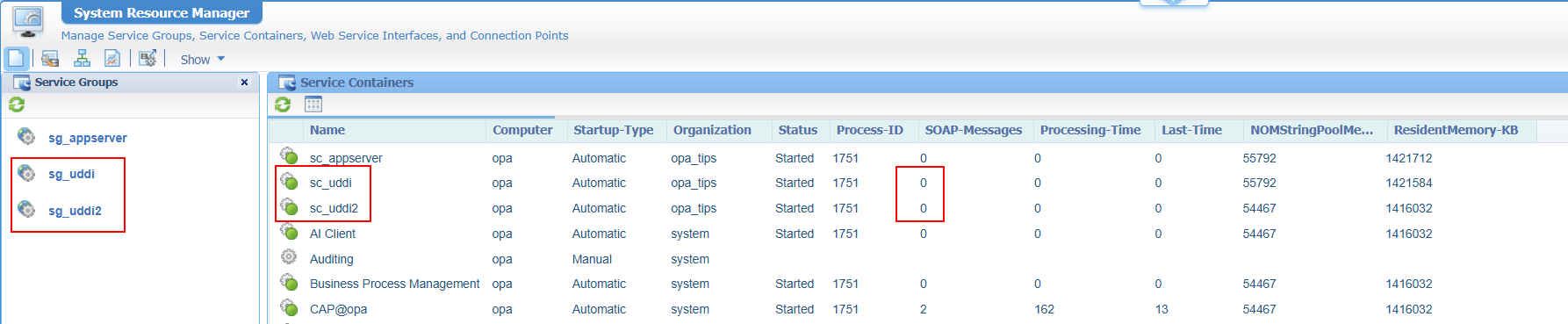
Now test your CapitalCity service again via the project or via the ‘Web Service Interface Explorer’ artifact and check the result:
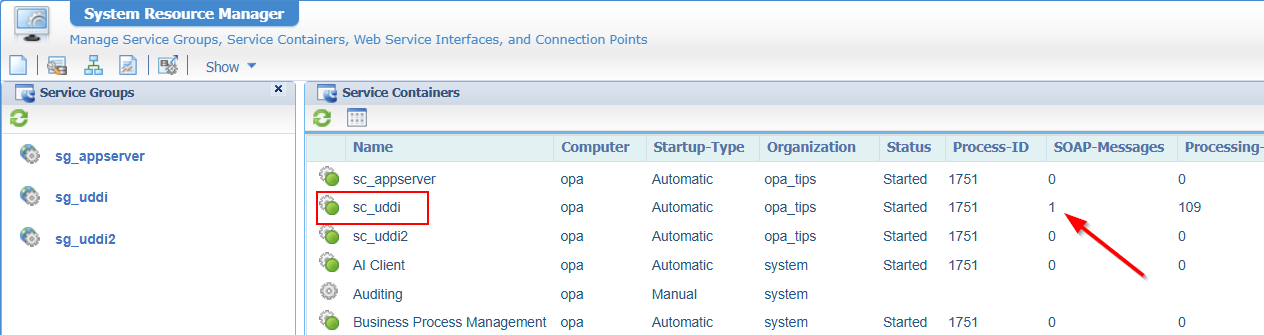
Why this one and not the other one? Well, both can manage a request from method set ws_countryinfo! However, when a request passes the Gateway.wcp URL (not for this post) it will follow the order of service groups in CARS/LDAP. You can clearly see this in the ‘LDAP Explorer’:
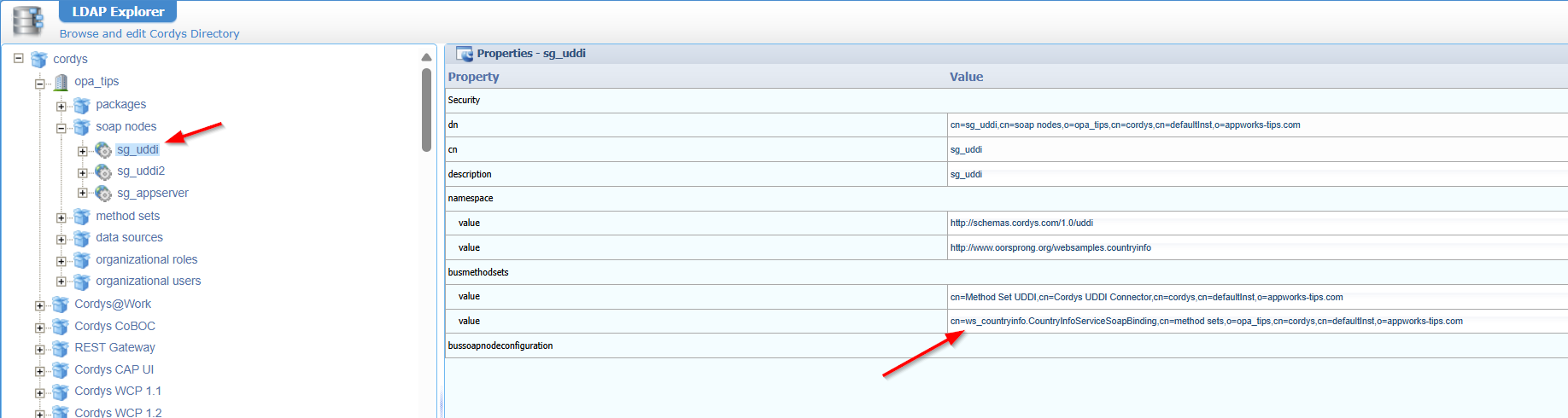
So, if I remove the method set from the first one, it’ll be managed by the second service group? Yes, my friend! Try it yourself…
Ok, but what if we want to choose which service container is used? Great question, but from a direct service call (from the project or the ‘Web Service Interface Explorer’ artifact) you can’t control this. However, there is a secret route where you CAN control this…
Control your service execution
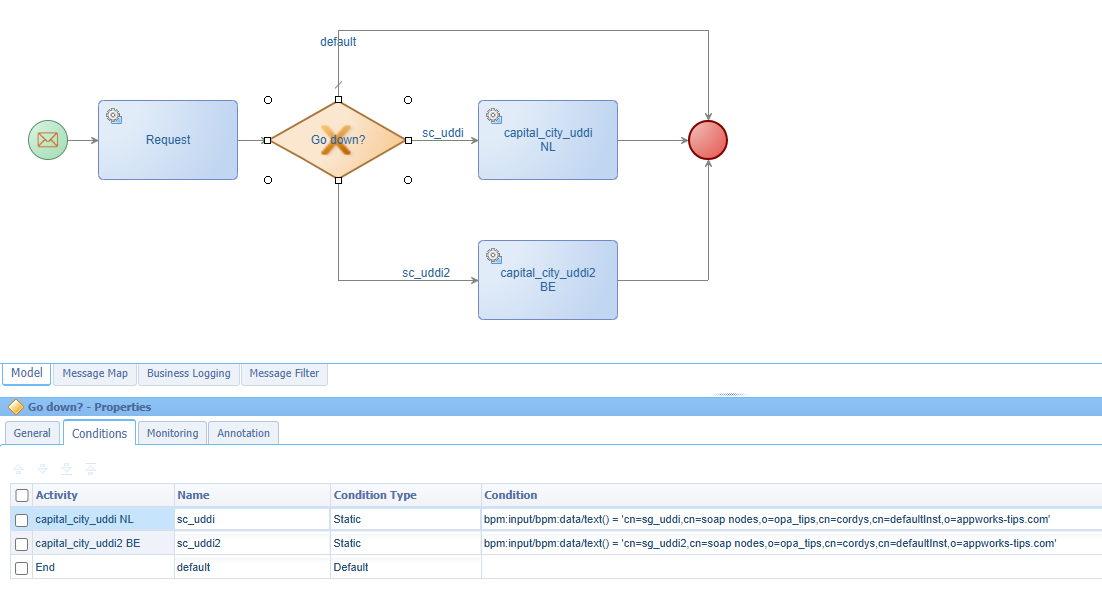
It’s time to dive deeper into our project by creating a BPM like this (nicely in the bpms folder of our project):
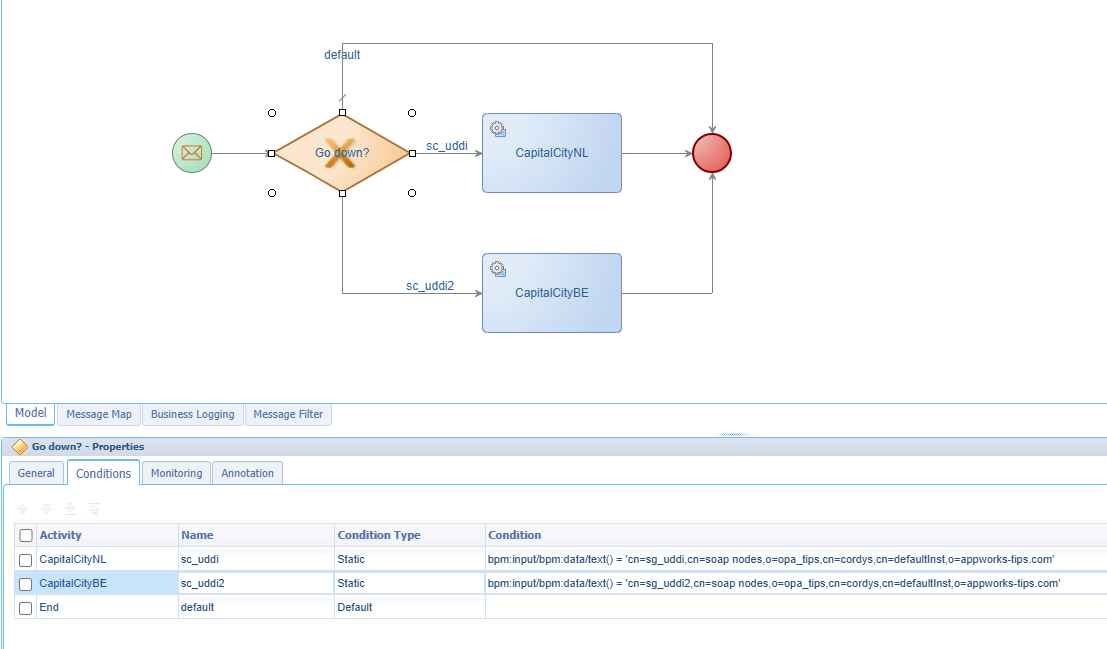
Notes:
- I don’t go too deep on the BPM itself as I conclude it’s (still) not working for my 26.2 version! Something which is also mentioned in the forum post
- It has an input message (on the green start construct) which has a
dataelement to pass in a value! This value will be the name of our service container!- I use an exclusive decision construct just to be in control of what needs to happen
- ‘CapitalCityNL’ will have a messagemap input with
NL; ‘CapitalCityBE’ will have a messagemap input withBE
The importance of service execution is in this screenshot (which you also see in the forum post):
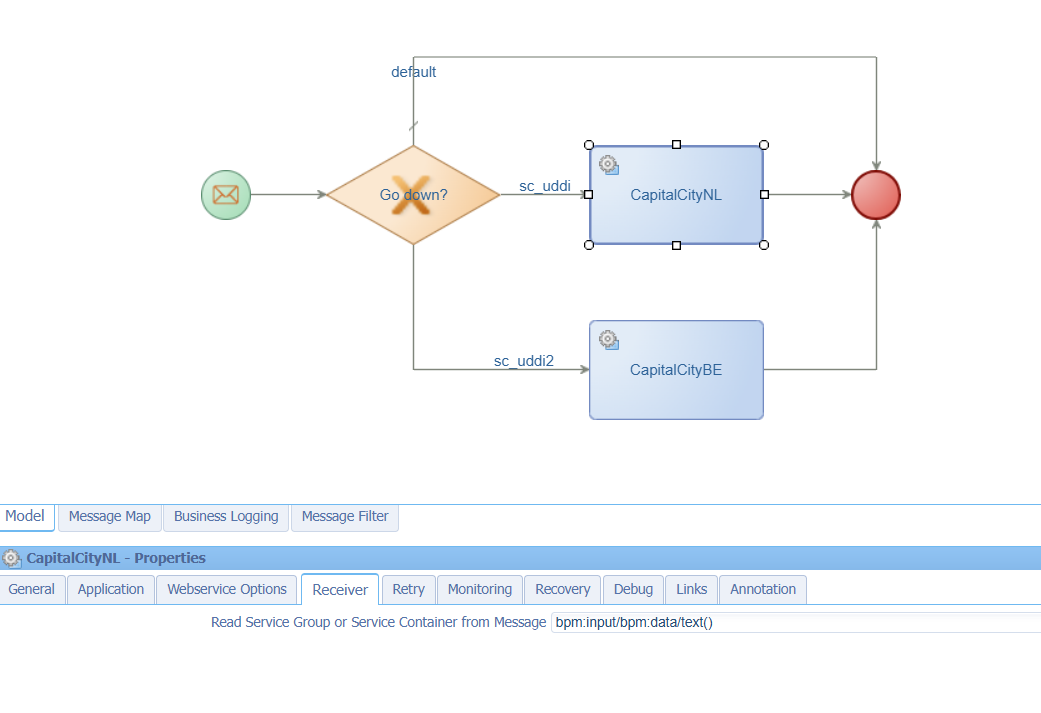
So, what will happen when I start the BPM? It will give me a pop-up to insert a value like this (the name of my service container):
1 | <input xmlns="http://schemas.cordys.com/default"> |
This is my second service container, so we “go down” in our flow triggering ‘CapitalCityBE’ with Brussels as a result (see the PIM for verification). However, if you check the ‘System Resource Manager’, you painfully get to the conclusion that the first UDDI container is handling the call and not the one we send in with the “receiver”! #BUG
After a tooooooo long R&D session, I conclude that the full request (inside the platform) looks like this, where you can clearly see the receiver details passing by:
1 | <SOAP:Envelope xmlns:SOAP="http://schemas.xmlsoap.org/soap/envelope/"> |
BUT it looks like the ‘Gateway’ of the platform (indeed!) does NOT act on the ‘receiver’ option passing by!
The workaround
Again, after a second toooo long remote debug session, the code tells me the same. However, the code also exposed another route to me via a URL parameter! I found this route by looking closely at these classes:
com.eibus.web.soap.Gateway.getReceivers(...);com.eibus.web.gateway.SOAPTransaction.findRequestDestination(...);
You find both of them in this JAR file:
$CORDYS_HOME/components/webgateway/webgateway.jar
In theory, it should be possible to make an HTTP POST request like this URL:
1 | http://192.168.56.107:8080/home/opa_tips/com.eibus.web.soap.Gateway.wcp?receiver=cn=sg_uddi2,cn=soap nodes,o=opa_tips,cn=cordys,cn=defaultInst,o=appworks-tips.com |
Check the receiver URL parameter where we provide our service container name!
If we try this via Bruno (a better alternative for Postman!) like this:
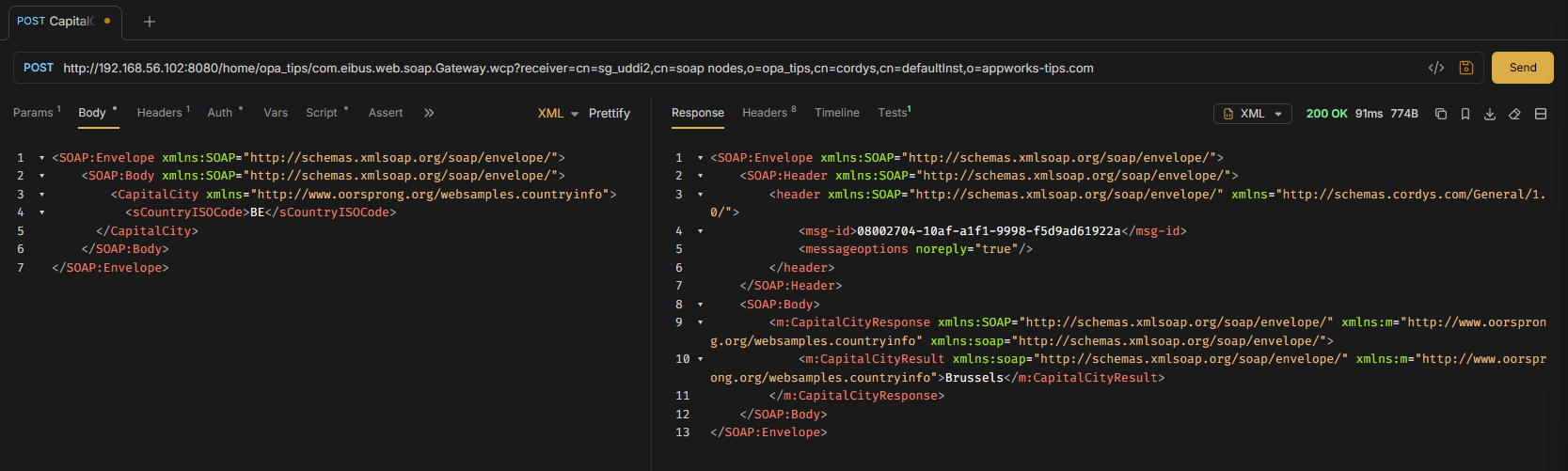
…You see it’s now executed by the correct service container! NICEEEEEE…
Be aware you need to pass an authentication header
SAMLart…A trick you’ll learn here
With this knowledge, we can now build a new HTTP service (via the HTTP connector). Something similar to what we did in this post. The only difference is that we now “wrap” a SOAP service into (again!) a SOAP service…How funny! 🙃
Here we go in quick steps:
- Add the ‘OpenText HTTP’ runtime reference of type ‘Application Connector’
- A new HTTP service container of type ‘HTTP connector’ (with
config.xmlas config XML) - An XML Store with ‘XML Store Definition’ (serving the
config.xml)
This is the content of this HTTP config file:
1 | <configurations xmlns="http://httpconnector.opentext.com/1.0/configuration"> |
With these details in place, we can now create another(!) new webservice (in the webservices folder of the project) with this input:
- Source: Custom Web Service
- Name:
ws_countryinfo_wrapper - Namespace:
http://schemas/opa_tipsprj_generic/ws - Interface name:
wsi_countryinfo_wrapper - Class:
HttpConnector(from our runtime reference!) - Operation:
capital_city
The capital_city operation will get this implementation:
1 | <implementation xmlns:c="http://schemas.cordys.com/cws/1.0" xmlns="http://httpconnector.opentext.com/1.0/implementation" xmlns:SOAP="http://schemas.xmlsoap.org/soap/envelope/" type="HTTP"> |
NOTES:
- Encode the
receiverparameter value to this:cn%3Dsg_uddi2%2Ccn%3Dsoap%20nodes%2Co%3Dopa_tips%2Ccn%3Dcordys%2Ccn%3DdefaultInst%2Co%3Dappworks-tips.com./Envelopein<root-xpath>./Envelope</root-xpath>is chosen wisely as it’s the body of our POST request which MUST start withEnvelope!- Use
StandardRequestHandlerinstead ofRestRequestHandleras it’s XML and not JSON we’re handling here!- Use
StandardResponseHandlerinstead ofRestResponseHandleras it’s XML and not JSON we’re handling here!- I would normally use something like this (with that parameter at the end)
<uri>/home/opa_tips/com.eibus.web.soap.Gateway.wcp?receiver={0}</uri>. AND read it with an XPath element like this<uri-parameters><parameter type="xpath">./receiver</parameter></uri-parameters>. However, theStandardRequestHandlerdoesn’t understand it for some strange reason!?
After publication of our webservice and restart of the service container, you can first do a SOAP call like this via the ‘Web Service Interface Explorer’ artifact (to grab a SAMLart token!):
1 | <SOAP:Envelope xmlns:SOAP="http://schemas.xmlsoap.org/soap/envelope/"> |
After this, you can pass the token in a request like this:
1 | <SOAP:Envelope xmlns:SOAP="http://schemas.xmlsoap.org/soap/envelope/"> |
Publish it all, restart the HTTP service container and try it out…
1 | <data> |
NICE…That’s a party again; ALSO, at service container level in the ‘System Resource Manager’!! 🥳
There is only one small aftertaste! Because we can’t pass the ‘receiver’ into a URL parameter (for some strange reason!?), we need to create two separate services; both with their own implementation where the other one will use the name of the other service container (again, encoded!). So, an implementation like this (sg_uddi2 is now sg_uddi):
1 | <implementation xmlns:c="http://schemas.cordys.com/cws/1.0" xmlns="http://httpconnector.opentext.com/1.0/implementation" xmlns:SOAP="http://schemas.xmlsoap.org/soap/envelope/" type="HTTP"> |
In that case I would also rename the resulting services like this (both having their own implementation sending the correct receiver):
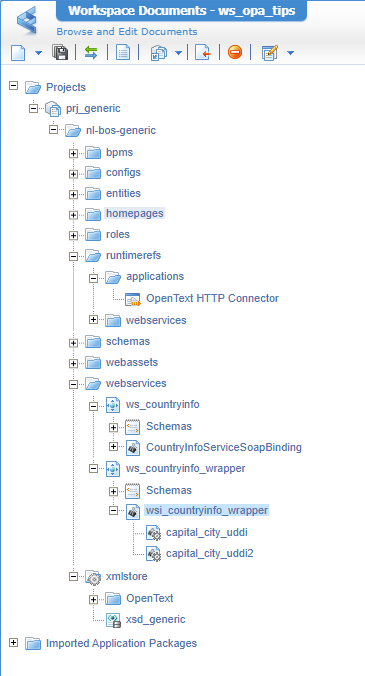
The BPM finally will look like this (where we can leave out the ‘receiver’ option on activity level!):
However, from a BPM service call something “special” seems to happen!? All of a sudden my service fails because <SOAP:Envelope> is not the root-node!?!? When I remove my <samlart>e0pBVkEtQ...</samlart> element from the request it’s fine, but then it complains about Anonymous access is denied for the Web service operation 'CapitalCity' which is correct as I don’t provide the SAMLart token anymore…weird stuff!
After fiddling around, I get to the conclusion I need to pass some kind of authentication in the Envelope. The only way I can think of using it is a header element; like this:
1 | <capital_city_uddi> |
The problem with this is the value of the AuthenticationToken! This must be a ticket from OTDS which you normally request with your credentials, but that’s exactly what we try to avoid here. We want to keep using the current user session. So, is there a separate way to grab that token value? Well, not from an OPA perspective; you’re stuck with a SAMLart token!
Eventually, I solved it without the header and by using a custom Java class MyStandardRequestHandler as explained in this post (long time ago!)
This is the code behind it and this is what it does:
- It grabs the SAMLart token from the initial request; I need to play with substring functions because it’s not really XML!? It’s more like this
<samlart>although IntelliJ shows it correctly!- Then it grabs the envelope node and creates a new Node out of it (so only with ‘Envelope’ and without ‘samlart’!)
- Finally, it sends out the request with an extra ‘SAMLart’ value in the request header.
Have a look at the consolidated view of the messagemap for a clear picture (read it from right to left!)
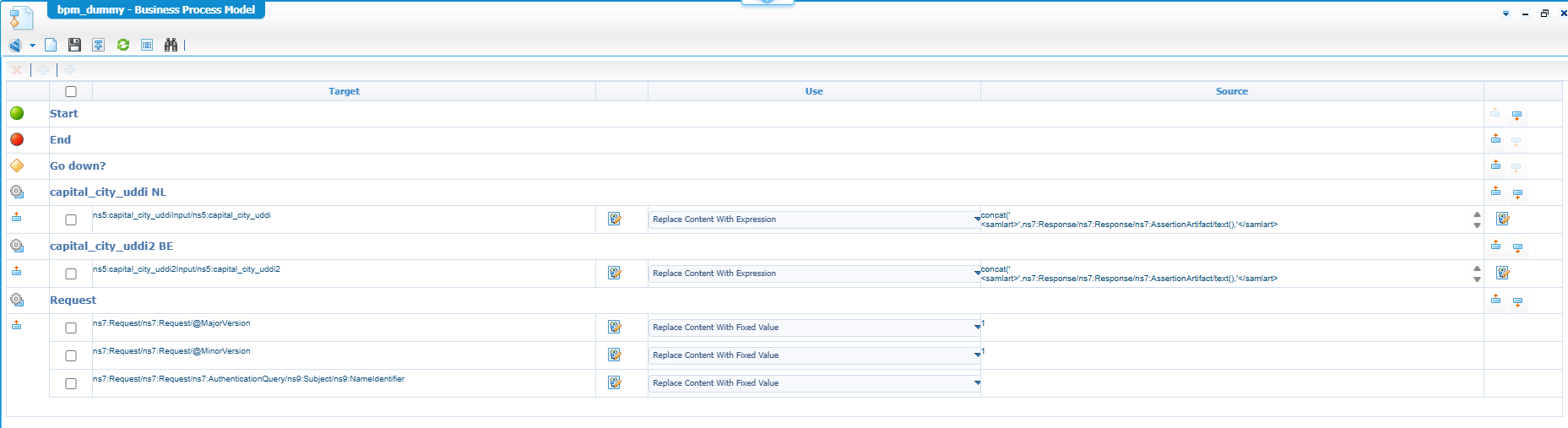
This expression is behind both calls (BE as input for the bottom one):
1 | concat(' |
Notes:
The
Requestactivity is possible after adding the runtime referenceSAMLProtocol(under the ‘Cordys Single Sign-On’ category) to your project!
The only difficulty here is the namespacing asEnveloperequires a namespace ofhttp://schemas.xmlsoap.org/soap/envelope/before it will fly. From the ‘Web Service Interface Explorer’ artifact, you don’t have this under your own control.
That’s a great “receiver” DONE…We now all know how to split logic across service containers smartly, in a controlled manner, and a small workaround fix in the code. Totally new for me, whereas you probably knew these details already!? If so, and also for other great topics, let me know as I’m willing to write something great about it to share with the world. I just continue with my backlog items to keep the grind going on fancy OPA knowledge and articles. Have a “good-vibes” weekend!
Don’t forget to subscribe to get updates on the activities happening on this site. Have you noticed the quiz where you can find out if you are also “The Process Automation guy”?
