


Hi there “Process Automation” fans,
Welcome to a new installment of “Process Automation” tips.
Do you know about the existence of the PDF “OpenText AppWorks Platform API Reference Guide”? Yes, it still has the good old name! It also refers to ‘Release 24.1’. Fascinating, as you would expect this document to get an update once new SOAP services are eXposed to the platform. Like the new sharing service (ShareEntityInstance and/or UnshareEntityInstance) in release ‘26.2’!? Well, it is what it is!
You can find the REST services guide here, but that’s not for now!
For this post, I want to dive into one specific SOAP service by the name of CreateDocument. It’s part of the ‘Document Store API’ with schema definition http://schemas.cordys.com/documentstore/default/1.0 (in case you want to search it with the ‘Web Service Interface Explorer’ artifact). Why this specific call? Well, because (in my current project) we use this call to upload documents from Process Automation into a business workspace (in xECM/OTCS). You can pass in a BusinessWorkspaceId element and other elements too, BUT the API reference guide tells me about one specific deprecated feature on element DocumentContent:
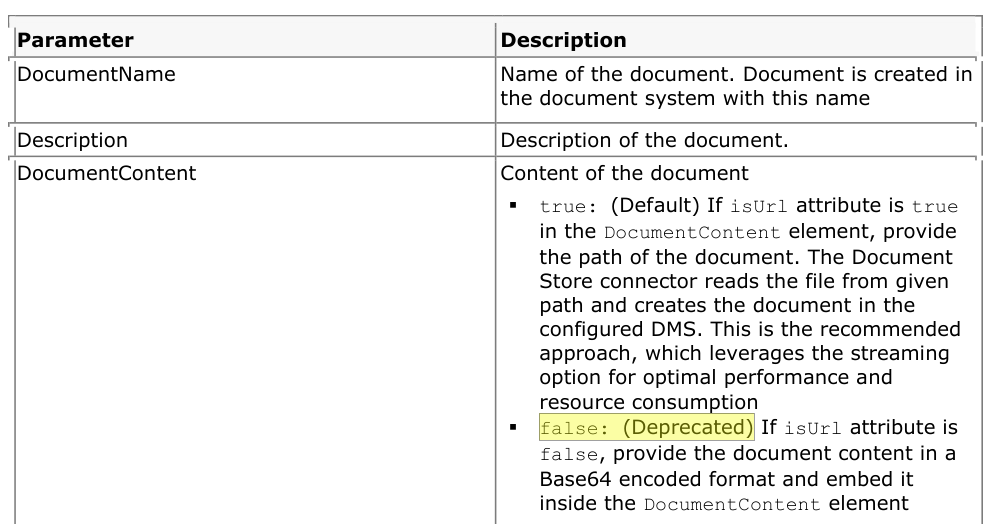
So, we can’t send in any Base64 content in the request anymore AND we need to solve this…
Do a search yourself for the word ‘Deprecated’ in the documentation and be amazed by the outcome (I got 380 hits in the reference guide alone!). Take action before it hits your solution!
Let’s get right into it…
In our current project (as with many other projects) we use a document generation tool (in our case SmartDocument…A Dutch company slowly growing globally!). Document generation happens over XML/JSON data and can send back a Base64 string OR save the generated file on a shared location (over the network). Base64 has its advantages (as you don’t build a second storage location of generated documents), but the disadvantage is the size! Larger content will generate a longer Base64 string. So, when you put this concept in terms of OPA and manage it in BPM logic, it can be a challenge…Especially on full messagemap eXposure!
That’s it for a little insider background information; we now dive into a first example call for CreateDocument:
1 | <SOAP:Envelope xmlns:SOAP="http://schemas.xmlsoap.org/soap/envelope/"> |
You see two variables in this SOAP message:
{businessWorkspaceId}is the ID of your connected business workspace in xECM. So, you need to have a solution with support for the business workspace building block!{base64_string}is a Base64 representation of the content/file. In my case, it’s a PDF because of the MIME typeapplication/pdf. You can convert a PDF to Base64 here.
What will happen in this call? Well, it’s a call from OPA to xECM. Like you would normally upload content in the runtime UI. Why not upload directly via the xECM/OTCS API layer?…It’s a Business Workspace in xECM? Right? You’re correct! However, CreateDocument will also do a registration in OPA so it’s “aware” of the creation (not for now)!
Ok, but how do you get rid of the Base64 string for this specific call, assuming that your document generation tool still sends out a Base64 string!? Well, is it smart to NOT generate Base64 from your document generation tool? Well, that’s a totally different question with a challenging answer. In my project, it was an architectural change, so we made the choice to convert the Base64 string into a file on the server (via the FileConnector), update the CreateDocument with a file URL, and delete the file once done. How? Well, let’s eXperience it together…
FYI: the ‘FileConnector’ has been an OpenText-supported package since release
24.3of the platform; before that, it was a “community” connector.
We’ll first eXplore some of the web services we require to call:
1 | <SOAP:Envelope xmlns:SOAP="http://schemas.xmlsoap.org/soap/envelope/"> |
1 | <SOAP:Envelope xmlns:SOAP="http://schemas.xmlsoap.org/soap/envelope/"> |
1 | <SOAP:Envelope xmlns:SOAP="http://schemas.xmlsoap.org/soap/envelope/"> |
1 | <SOAP:Envelope xmlns:SOAP="http://schemas.xmlsoap.org/soap/envelope/"> |
You see me using a
{bpm_identifier}variable for the filename in the ‘FileConnector’ calls. The reason for this is that the BPM (having these service activities) will run multiple times (even in parallel!). You don’t want to overwrite files from another BPM instance! For theCreateDocumentcall it’s fine, as that one already stores to a unique workspace ID.
With this information, we can now create a BPM like this:

Notes:
- To make use of these services in your solution, you require new runtimereferences of type ‘Web Service Interface’.
- Category ‘Cordys File Connector’ with method set
Method Set FileConnector- Category ‘Cordys Document Store’ with method set
Method Set Document Store- The BPM also uses an input message with
input.base64,input.bws_id,input.path, andinput.foldernamevalues, which makes the BPM reusable.
This is the consolidated view of the messagemap for this BPM, to help you understand the configuration parts (read from right/source to left/target; don’t shoot the messenger!):
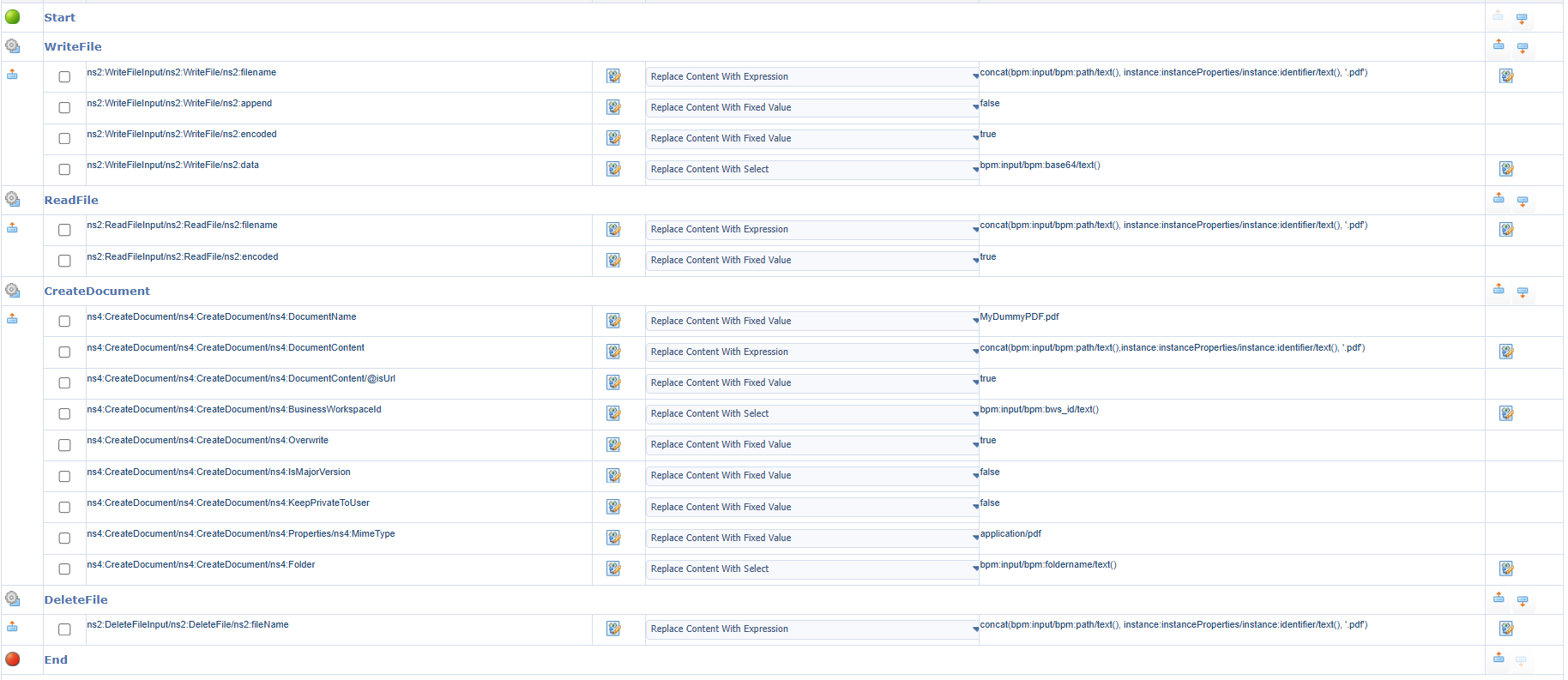
You can start the BPM (with <F12> in the template) and use this example input:
1 | <input xmlns="http://schemas.cordys.com/default"> |
After this, you will see a green completed BPM instance in the PIM. At runtime, you’ll see the document nicely dropped off in the folder of your connected business workspace (in xECM). You’ll need to imagine this one for yourself, as it’s a solution (to be!) implemented at the customer to replace the deprecated function.
That’s a nicely crafted “DONE” where we solved an important deprecated function for our current project. The holy grail would be to solve it at the root (at document generation level), but if you conclude that’s a mission impossible AND you don’t want to wait until the function drops off, you need to act now. Share these details with the world and let others eXperience your knowledge. This mindset will help you in the future as “Give, and it shall be given unto you. - Luke 6:38, KJV”. Cheers and have a great weekend!
Don’t forget to subscribe to get updates on the activities happening on this site. Have you noticed the quiz where you can find out if you are also “The Process Automation guy”?
