


Hi there “Process Automation” fans,
Welcome to a new installment of “Process Automation” tips.
We start this time with hashtag #OMG; It’s weird how your mindset can change after a little R&D session during the weekend. I did see something highly valuable passing by where I always advised to get rid of it as soon as possible. What am I talking about? Well, it’s the BIRT-connector of the OPA platform. It’s clearly not found anymore in the software packages of the OPA platform itself (and maybe it was also never there), but I did find it again on a public location on the interwebs. Is it still valid to use software from before 2012? Well, normally I would say NO; however, I can also say that it depends!? If it’s built sooooo solid and mature that you can still deploy and use it in OPA 26.2, well, that also tells something! So, instead of moving away from it; I embraced it, did a deep-dive, amazed myself, and asked myself (again!) what would be the reason why companies buy licensed PDF rendering tools for all their reporting!?
Let’s get right into it…
I split this post into two posts. One for bringing alive the connector itself; next week we’ll dive into the report creation and rendering a PDF report from a BPM. So, where to start as I only saw one customer using this connector (you know who you are)! However, I can’t find this connector in the software package of the platform; neither I can find it on the support site of OpenText!? So, it was strange when I found it on this Google archive location! Totally undocumented, but what can go wrong with a good old solid piece of software? Well, the virus total isn’t complaining!
So, it’s time to unwrap the CAP file to see what’s inside! A CAP-file always has a manifest.xml file eXposing package details where the header is the most important:
1 | <Header> |
Notes:
<PackagedAt>1354861293572</PackagedAt>; that’s a timestamp on Friday, December 7, 2012 at 6:21:33.572 AM (UTC)- It’s version
2.0.8for the package created by the (good old)Cordysvendor. Normally this isOpenText!<PlatformVersion>D1.002</PlatformVersion>; that’s interesting! As OpenText adds normally numbers like26.2. So, we know that (in the past) the platform was calledC1,C2, andC3, but probably it also hadD1as a name…AHA!! And how aboutD2? Fascinating! AsD2is a French initiative for a client for Documentum…AHA AGAIN!! Does that make a closed circle? Who knows!? 🙃- Finally, it’s deployable in the ‘Shared/system’ space!
Let’s continue on what else is in the package? It looks like most things are pretty solid and still used these days. There is some JavaScript going on; only core JS without any fancy libraries except the usage of the cordys object from the corresponding (and still valid) /cordys/wcp/application.js! Great, what about any Java? Well, I only see one JAR file containing the com.cordys.eclipse.birt.connector.BIRTConnector class extending the regular com.eibus.soap.ApplicationConnector class of the platform; also, still valid like we did here! No eXotic libs included; again, core Java (like in the good old days!) and a little org.eclipse.birt.core.framework.* stuff which we’ll get back on later!
Finally, I see that the package installs a role BIRT Report User which we probably need to execute the exposed service GetReport (delivered in the CAP package too).
So, research done; it’s time to deploy that CAP file into the system space of my OPA platform with version 26.2! Start up the VM and dive (with the sysadmin account) into the /system organization of your OPA instance. Open the ‘Application Deployer’ artifact, leave it on ‘Shared’, browse to the downloaded CAP file (Cordys BIRT Reporting Connector 2.0.8.cap), and hit ‘Upload and Deploy’…You just follow the rest of the wizard to make it a success; it’s a simple task!
If you get signature verification issues during the wizard, you can enable to allow unsigned applications from the ‘Security Administration’ artifact (tab ‘Code Signing’!)
Once done (not sure if it’s needed; probably not), I restart TomEE because of the deployed JAR files.
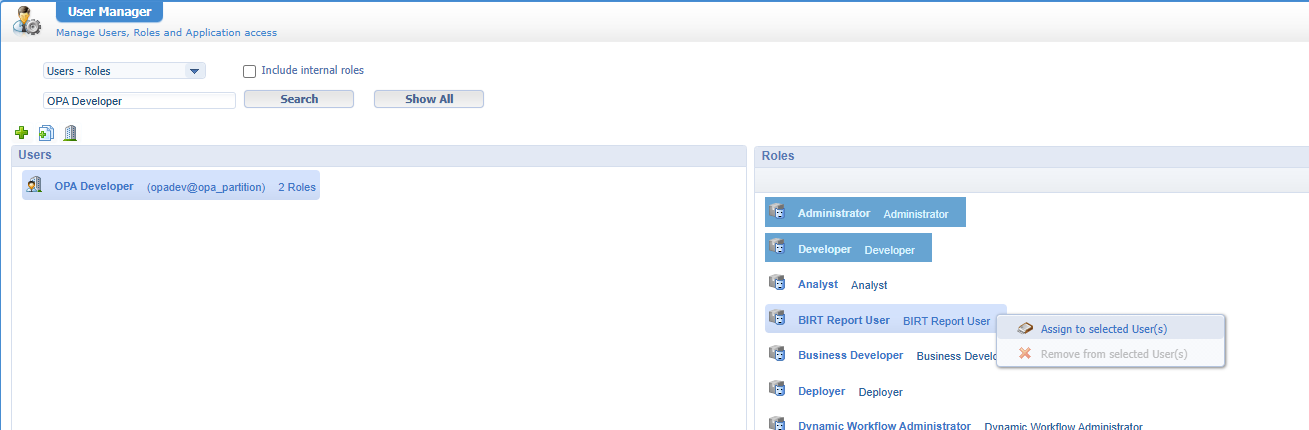
Now go to your own organization, and add your account to the ‘BIRT Report User’ from the ‘User Manager’ artifact:
Then, go to the ‘System Resource Manager’ artifact and create a service container with this input:
- Connector type:
BIRT Reporting Connector - Group name:
sg_birt - Select the method set
BIRTServices.ReportServices - Service name:
sc_birt - Startup: automatically
- Assign to OS; recommended by OT by default for all service containers!
- Report directory:
/opt/opentext/ProcessAutomation/defaultInst/birt(no end/needed!)
Make sure you have that last directory available on the OPA server (with sufficient read/write permission)! We’ll use it next week…
When you start the service container, you’ll hit the first error: java.lang.ClassNotFoundException: com.cordys.eclipse.birt.connector.BIRTConnector. To solve this you need to add the BIRTConnector.jar file to the JRE classpath of the service container; like this: /opt/opentext/ProcessAutomation/defaultInst/coe/BIRTConnector/BIRTConnector.jar
Restart TomEE; when you try again, you’ll hit the next error: Unknown Error: org/eclipse/birt/core/framework/PlatformConfig. So, the connector wants to start a framework (better known as BIRT-runtime), but it’s not available (yet!). Now what? Well, download BIRT runtime here; Mine is birt-runtime-4.24.0-202606100854.zip
We’ll use
birt-report-designer-all-in-one-4.24.0-202606100854-win32.win32.x86_64.zipnext week!
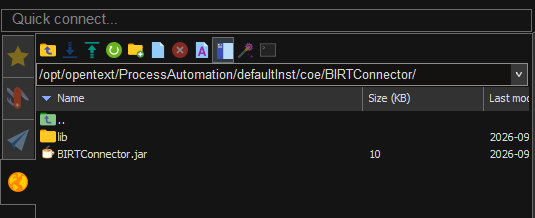
Extract the ZIP, open the folder, and upload the ReportEngine\lib directory into /opt/opentext/ProcessAutomation/defaultInst/coe/BIRTConnector/; So, you have this on your server:
Right, we want to have those libraries on that same JRE classpath configuration; however, we can now do any of these 2 things:
- Create a long string separated by
:(because of Unix); Easily generated with this command:
1 | find /opt/opentext/ProcessAutomation/defaultInst/coe/BIRTConnector/lib/ -maxdepth 1 -type f -name "*.jar" -printf "%p:" | sed 's/:$//' |
- Create a simple JAR file with only a
MANIFEST.MFpointing to the JAR files and add only this new JAR to the JRE classpath…AHA!
Watch these Unix commands to make it happen:
1 | cd /opt/opentext/ProcessAutomation/defaultInst/coe/BIRTConnector |
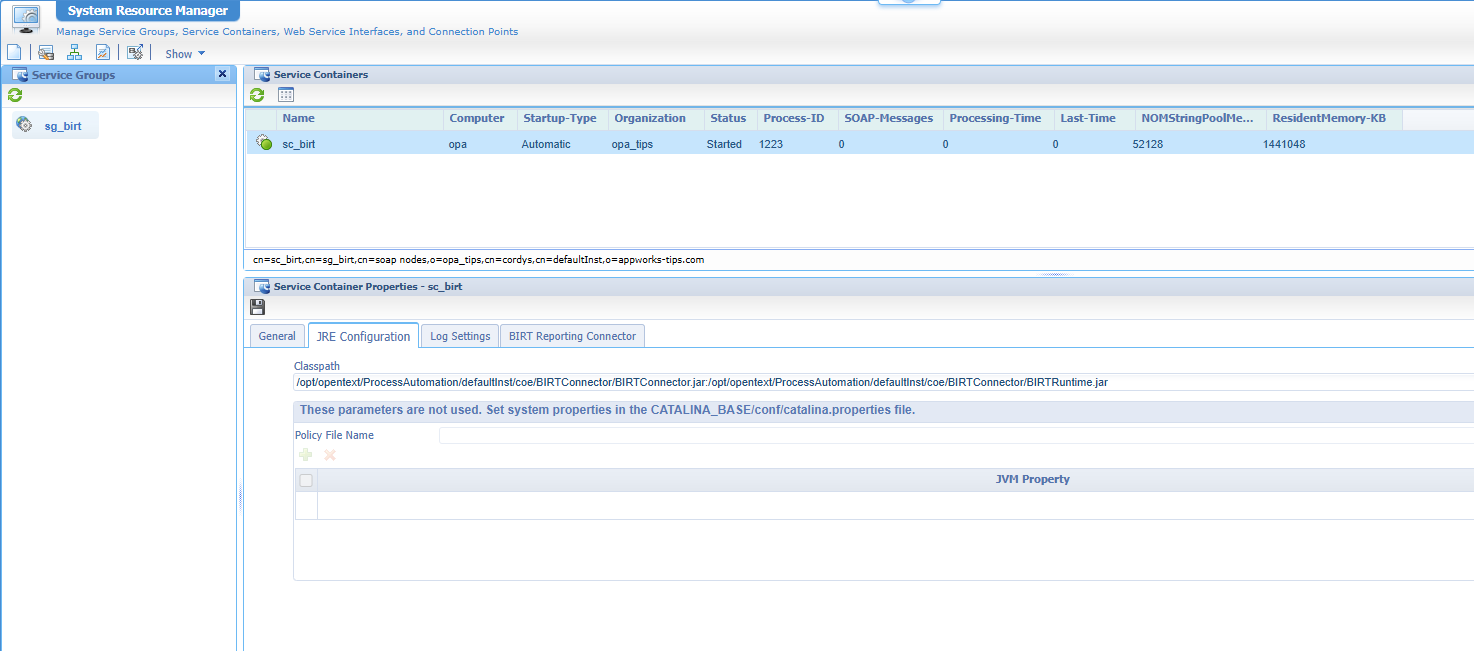
Now update the JRE classpath on the service container like this:
1 | /opt/opentext/ProcessAutomation/defaultInst/coe/BIRTConnector/BIRTConnector.jar:/opt/opentext/ProcessAutomation/defaultInst/coe/BIRTConnector/BIRTRuntime.jar |
After the change, you can start the service container with a green light:
That’s a first step DONE on bringing alive the BIRT connector again including some fascinating insights on the third party (Cordys) CAP package. We all love green light on a service container; it’s like a cherry on the cake after doing R&D. For this post that’s all…Have a great weekend; next time, we’ll dive into the reporting itself and generating a nice PDF report with the service call GetReport in the namespace http://schemas.cordys.com/BIRT/; cheers…🍻
Don’t forget to subscribe to get updates on the activities happening on this site. Have you noticed the quiz where you can find out if you are also “The Process Automation guy”?
