


Hi there “Process Automation” fans,
Welcome to a new installment of “Process Automation” tips.
A while ago, we did a post about grabbing the comments for a task. We stumbled on some inconveniences and at the end, we eventually extracted the correct data from the OPA database itself via the WS-App connector. A great trick which we almost implemented in our current project for a similar use-case, but on different data. However, we found something smarter!
The use-case is not exactly the same, but this post shows a splendid example of how to “wrap” a platform REST call into a SOAP call. Why? Well, so we can call it from a BPM perspective…that’s why!
If you’re looking for a way to expose platform SOAP services as REST end-point (serving JSON) for your outside portal teams, read about the REST gateway connector. Again, a different use-case with a high demand.
Let’s get right into it…
Our beloved platform slowly embraces the power of REST end-points over SOAP end-points. This is great, but we also see a disadvantage! We now see REST services that don’t have a SOAP equivalent, or REST services that do have a SOAP equivalent, but showing an improved result. Keep in mind that BPM service calls only support SOAP calls (or REST calls wrapped in a SOAP call!) and you understand the disadvantages.
BUT we wouldn’t be “Process Automation Tips” if we didn’t find a solution for this struggle. It’s time for an example…
Boot up your VM and dive into your workspace with corresponding project. Create a simple ‘Case’ entity with some fancy building blocks like this:
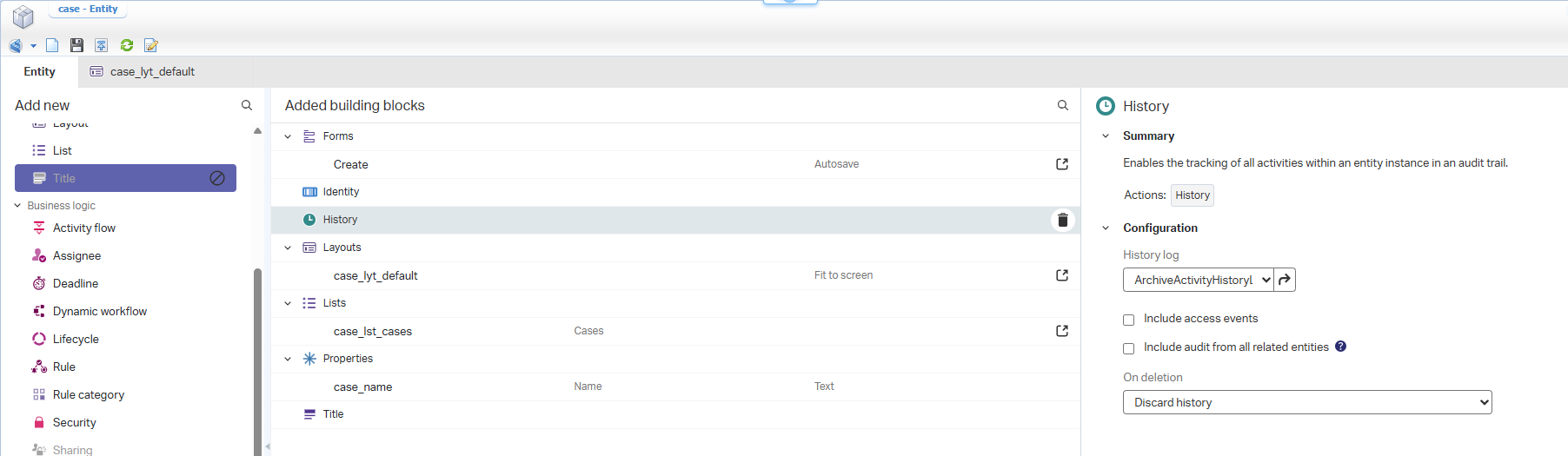
Notes:
- Update the layout with a corresponding panel for the ‘History’ BB.
- Add a configuration for the ‘History’ BB…You can use the already available ones from the list.
- Add display labels for the entity name and the list which we directly see in runtime.
Publish it all and jump to runtime for a new case instance creation. After creation, open the developer tools of your browser, and open the instance. You see this request passing by to receive the historical details of our instance:
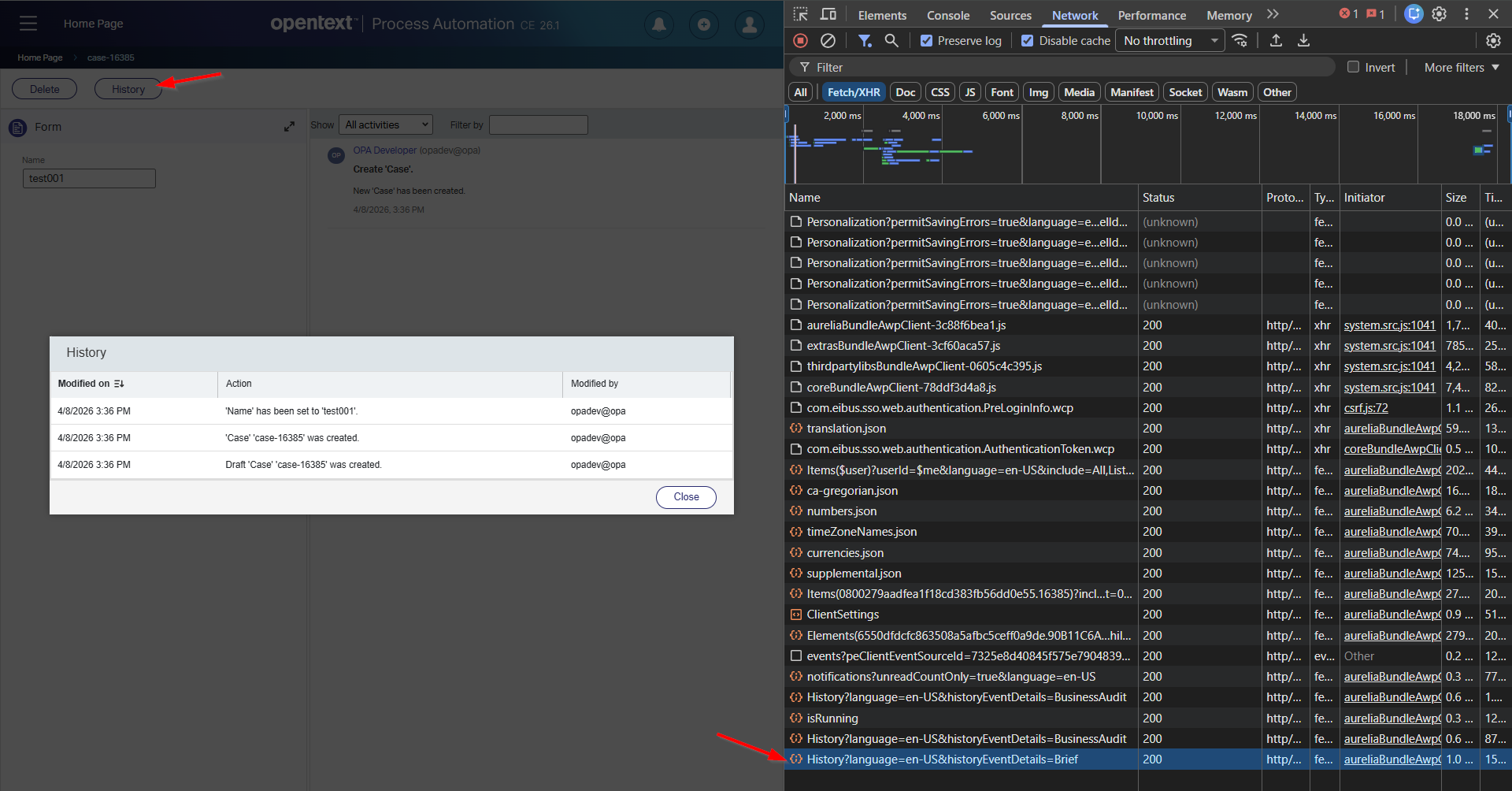
It’s a REST GET request to: http://192.168.56.107:8080/home/opa_tips/app/entityRestService/Items(0800279aadfea1f18cd383fb56dd0e55.16385)/History?historyEventDetails=Brief
The result is this JSON data:
1 | { |
These are also valid parameters for that GET request URL:
?historyEventDetails=BusinessAuditand?historyEventDetails=CurrentItemBusinessAudit
You can open this URL in a new tab, but there is a different route to call it yourself! Via the ‘Web Service Interface Explorer’ artifact? Well, NOPE…At least, I couldn’t find any relevant SOAP service to grab these same details! Go to the administration console and open the Typed REST layer of the solution:
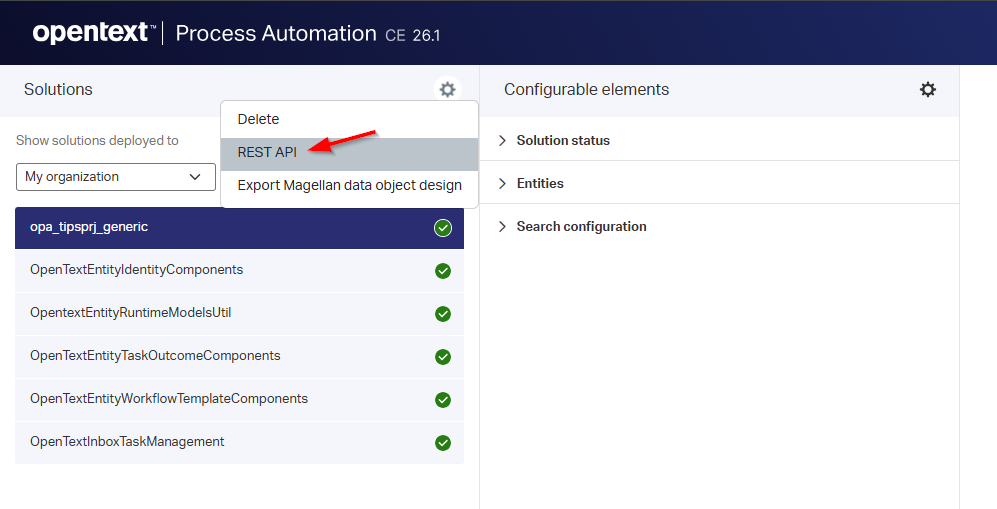
This brings you to a nice “SwaggerUI” where you can play with REST services…including our previous ‘History’ call:
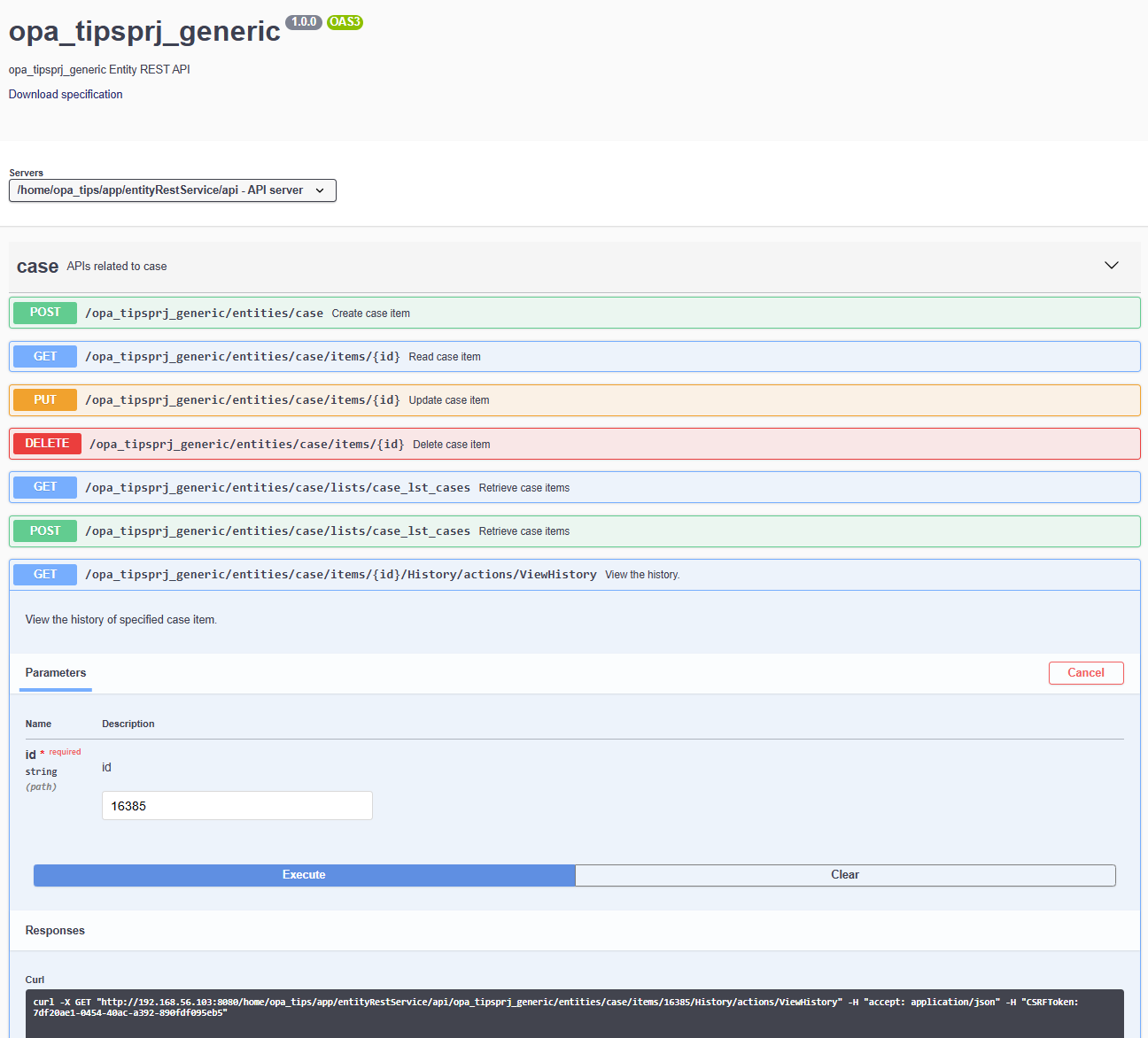
It is interesting to see that the result is the same, but the URL now looks like this:http://192.168.56.103:8080/home/opa_tips/app/entityRestService/api/opa_tipsprj_generic/entities/case/items/16385/History/actions/ViewHistory
It’s an API URL; so, we use this last one for our next section of the post!
FYI: I tried to add the ‘Web Service’ building block with READ operation (incl. an ‘Application Server’ connector as service container). Again, there is no history in the result of the READ operation. I even tried to search for ‘history’ as an operation, but there is no SOAP service indicating it…Comment if I’m totally wrong here!
Right, how do we continue here, as my goal is to grab the historical details of the entity instance from a BPM perspective…which only supports SOAP calls!?
The HTTP connector to the rescue
The HTTP connector? Yes, this thing! Wasn’t this thing only for calling external REST end-points? YES, you are partly correct as what stops us from calling our own OPA platform Typed REST layer via the HTTP connector? Well, good question…But is it possible?…Well, let’s find the answer!
Following that post, I have these bullets in place now:
- A run-time reference of type ‘Application Connector’
- A new HTTP service connector (with
config.xmlas config XML) - An XML Store with ‘XML Store Definition’ (serving the
config.xml)
This is the content of this HTTP config file:
1 | <configurations xmlns="http://httpconnector.opentext.com/1.0/configuration"> |
With these details in place, we can now create a new webservice with this input:
- Source: Custom Web Service
- Name:
ws_typed_rest - Namespace:
http://schemas/opa_tipsprj_generic/ws - Interface name:
wsi_typed_rest - Class:
HttpConnector(from our runtimereference!) - Operation:
view_history
The view_history operation will get this implementation:
1 | <implementation xmlns:c="http://schemas.cordys.com/cws/1.0" xmlns="http://httpconnector.opentext.com/1.0/implementation" xmlns:SOAP="http://schemas.xmlsoap.org/soap/envelope/" type="HTTP"> |
After publication of our webservice and restart of the service container, you can do a SOAP call like this:
1 | <SOAP:Envelope xmlns:SOAP="http://schemas.xmlsoap.org/soap/envelope/"> |
The result…Well, it’s a failure:
1 | Response Handler |
Why is this? Well, see what will happen when you open a new browser (or new incognito) where you don’t have any login session available for the platform. What happens? Yes, you’re forwarded to an OTDS login screen which is in HTML format, matching our error…AHA! So, do we need to pass on credentials!? Yes, but not credentials itself…Just our current session OAuth-ticket will do the trick. Where do we get these details? Well, how about following our own post!
After this, we’ll have another runtimereference available of type ‘Web Service Interface’. The name is SAMLProtocol in the package Cordys Single Sign-On. It has an operation Request which we can call like this:
1 | <SOAP:Envelope xmlns:SOAP="http://schemas.xmlsoap.org/soap/envelope/"> |
This will return the AssertionArtifact for the current user which we can use in our follow-up call view_history. To make this last one work we need to extend the implementation with an authentication header:
1 | <implementation xmlns:c="http://schemas.cordys.com/cws/1.0" xmlns="http://httpconnector.opentext.com/1.0/implementation" xmlns:SOAP="http://schemas.xmlsoap.org/soap/envelope/" type="HTTP"> |
AND we need to pass in our artifact value in the SOAP call:
1 | <SOAP:Envelope xmlns:SOAP="http://schemas.xmlsoap.org/soap/envelope/"> |
Publish it all, restart the HTTP service container and try it out…
1 | <data> |
NICE…That’s a party!! 🥳
A valuable “DONE” again where we reused our previously learned skills with a fascinating external call to convert any entity Typed REST operation into a solid reusable SOAP operation for our BPM implementations. I always thought this was impossible until we just tried it out at a great project in the Netherlands. The theory was quickly explained, but it took a while before it all “snapped” in place. This post shows you the outcome. Keep it locked here at “OpenText Process Automation Tips” for more posts and insights on the OPA platform. Have a great weekend with friends, family, and drinks.
Don’t forget to subscribe to get updates on the activities happening on this site. Have you noticed the quiz where you find out if you are also “The Process Automation guy”?
