


Hi there “Process Automation” fans,
Welcome to a new installment of “Process Automation” tips.
Process Automation 26.4 for Q4 2026 is GA. I did a quick preview on the release notes, but it’s not that big; it’s mostly fixing old pain on choices in the past. That’s at least how it feels. Strange, as the last release was 26.2; 6 months ago!
Let’s jump through the list of new functions and features. Take your coffee and cake to consume yourself on this new 26.4 release!
What happened with release
26.3? Well, OpenText decided to release twice a year since version26.2!
Let’s get right into it…
I do an upgrade from version 26.2.8 to this version, following my own upgrade post; just because it takes less time. I upgrade CARS from 2.8.14 to version 2.8.16, I leave the OTDS instance 26.1.0 as is, and don’t need any xECM this time. This post reviews the OpenText Process Automation CE 26.4 Release Notes PDF. I’ll jump through each feature one by one in the following sections.
The quick tag at OT support is #ProcessAutomation26.4!
I always struggle to find the PDF “OpenText Process Automation Supported Environments”; So, here is the link!
…
The only issue I had was around the package ‘OpenText RPA Client’; I needed to select a DSO where I selected the default cordys (including the creation of tables option!). It gave this error in the logging:
1 | com.cordys.cap.exception.CAPRuntimeException: |
In a second try, I disabled the option to create the tables, and it was fine (RPA was also already deployed on my VM before the upgrade!). I did this retry (FYI) from the ‘Application Deployer’ artifact in the system organization!
…
It’s time to continue with the list of new features…
🆕 Update on the available changes in 26.4 🆕
‘Support’ and ‘steadiness’ are the keywords for this release as I only see one real change useful to discuss here and that’s ‘Search and filtering on the history’. The rest is installation, administration, and platform support. Still, we go through them as well as possible with my enthusiastic way of writing…
Process automation without OpenText CARS/OpenLDAP
This feature was already put on the testbench in release 26.2. These great questions of course stay:
- Can we migrate (with a tool) from CARS/OpenLDAP to a “CARS”/database? #SPOILER_ALERT, yes we can!
- Is consolidation from OTDS to OPA still working!?
- Is the CMC tool still working!?
Well, here are the answers for this release…
…#A_FEW_HOURS_LATERS
When #RTFM, I see a note passing by in the installation manual we should all be aware of:
1 | OpenText CARS is deprecated. OT recommends using the new |
Migration tool?
Again, #RTFM as more information is found in the ‘OPA Upgrade Guide’ under appendix ‘Appendix E – Migrating the LDAP Directory Store to a Relational Database’. I followed the steps on my upgraded 26.4 VM which was installed with CARS (so, USE_DB_AS_LDAP=false AND no ldap_% tables in the database).
From the release notes: the migration from OpenText CARS to the DB should be planned and executed as a separate activity after the upgrade to version
26.4!
Locate the ldaptodbmigrator; it reads LDAP data in LDIF format, creates the DB schemas and populates them. It also updates the wcp.properties file to use the DB after a restart. Mine is found in cd /opt/opentext/ProcessAutomation/defaultInst/bin/.
First we’ll do a dry-run: ./ldaptodbmigrator.sh --cars-home '/opt/opentext/cars/defaultInst' --work-dir '/tmp' --dry-run
This is the outcome:
1 | ================================================================ |
Interesting outcome as it clearly warns about Log4j settings and more specifically this line in the Log4j2Configuration.xml:
1 | <Configuration |
Check also the new files in the
/tmpdirectory:validation-report.txt,migration-report.txt,backup.ldif
Nice, but it’s still only a warning so I’m not changing things…Let’s do a real run!
./ldaptodbmigrator.sh --cars-home '/opt/opentext/cars/defaultInst' --work-dir '/tmp'
Provide the database password; mine is just admin (ask your database administrator). Eventually the tool starts to stream data and gives some solid responses:
1 | [OK] Migration completed successfully. |
It’s time to restart TomEE with systemctl restart tomee. In the meantime, I already checked my DB where I see the ldap_% tables passing by already…NICEEEE! The platform boots up again AND I can also log in again with my old OTDS accounts.
OTDS Consolidation?
Guess what…works like a charm again AND without any error in OTDS log directory-provenance.log…Fantastic job for my non-upgraded OTDS with version 26.1.0.12892!
CMC tool?
Well, watch this:
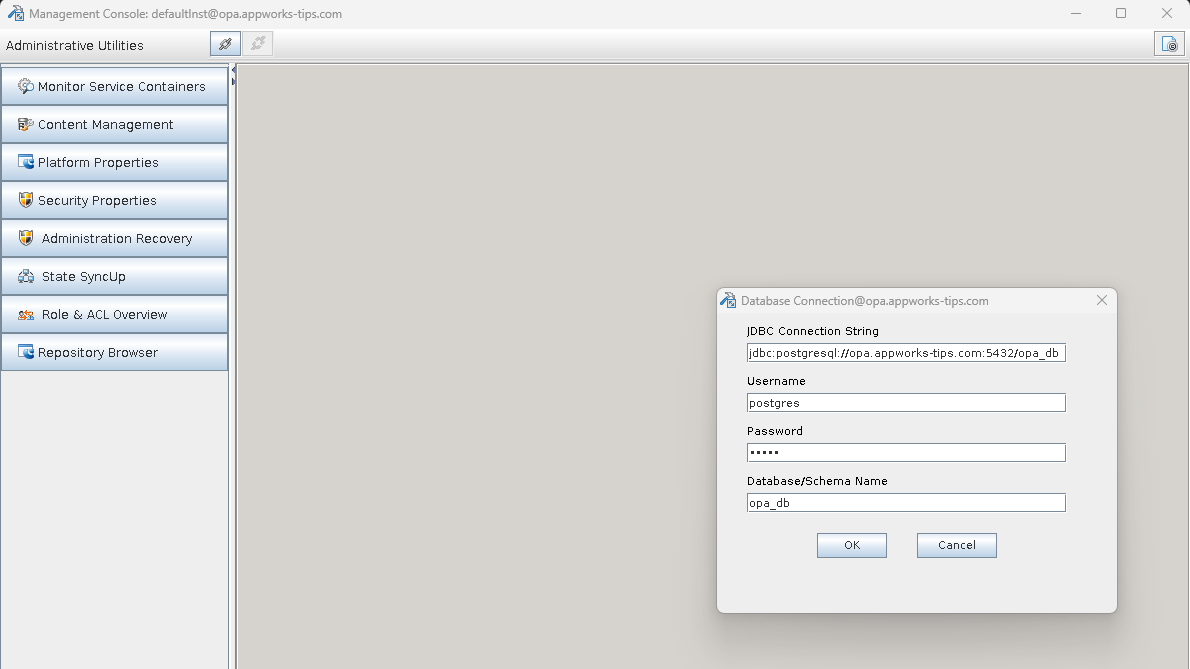
That’s a DB connection!
And is it all working? YES it is…it’s magic! ✨
A big #SHOUT_OUT to the development team of the platform for this great accomplishment. 👌
…
FYI: I also noticed a new file
$CORDYS_HOME\$config\ccmu.propertieswith this content:
2
3
4
5
#Tue Nov 03 16:36:59 CET 2026
bus.ccmu.administrator.user=cn\=Directory Manager,o\=appworks-tips.com
bus.ccmu.ldap.server=opa.appworks-tips.com\:6366
cars.instance.name=defaultInstAND some new props (
bus.ldap.processor.*) in thewcp.properties
Finally, you can stop and disable CARS systemctl stop|disable cars-slapddefaultInst, remove the left-over CARS stuff, and save some resources on our VM…I leave this with you!
New UI eXperience for OTCM for Government integration
OTCM Government!? I heard of it a long, long time ago. It also smells a little like the term “DigiGov”! Searching the OpenText support site brings me to ‘OpenText Content Management for Government 26.4’ PDFs. Browsing through them tells me about eFile, eCases, Business Workspaces, WebReports, and the German ‘xdomea’ standard. So, that’s just xECM with an extra government sauce around it. It’s too much to cover in this overview post on release; I’ll put it on the backlog.
What is changed for this version? Well, launching government workflows will have a redesigned interface aligned with the rest of OTCM for a better user eXperience. Starting such a workflow is clearly possible from OPA where the end-user will have a consistent, intuitive, and efficient workflow eXperience with the reduction of “context” switching between applications.
You need to #RTFM as the integration is (in high overview) based on these terminologies/settings:
- Entity ‘Dynamic Workflow’ building block
- One OTDS instance between OTCM and OPA
- A full xECM configuration with DocumentStore connector
- Deployment of
otsapxecm.war - The availability of services like
ECMLinkandDocumentManagement - In OPA
/app/adminthe solution configuration forOpenTextDynamicWorkflowforExtendedECMfor business workspace linking - A
wcp.propertiessetting onplatform.integration.xecmworkflowintegration=trueandplatform.configuration.yamlFiles=solution.yml - Configuring CORS for Dynamic Workflows in OTCM
- Finally, configure Dynamic Workflow parameters in the OTCM admin pages
If you use this xECM government integration with OPA, let me know…I love to have a quick tour!
Search and filtering on the history
Also, this feature was already put on the testbench in release 26.2. It looks like the ‘Preview’ stage is removed and now enabled by default. This feature comes with a migration utility to update old history records (before this release). Somebody (not me) clearly found a bug that old records are not filtered. BUT how to run this utility? Well, the #RTFM isn’t immensely helpful again!? Searching for ‘migration’ isn’t finding anything pointing to this “utility”…How great! You note it in the release notes, but don’t point out where it’s located?
…#A_FEW_MOMENTS_LATERS
I took a comparison R&D session with WinMerge between 26.2 and 26.4 components folders, and I found eventually this small secret at this location:
1 | $TOMEE_HOME\webapps\home#app#entityRestService\WEB-INF\lib\entityCore.jar\com\opentext\cordys\entityCore\HistoryResource.properties |
This file tells about these insights:
1 | UpgradeRequiredMessage=History data contains compressed records. Run the upgradeUrl endpoint before querying history. |
So, what are we waiting for:http://192.168.56.102:8080/home/opa_tips/app/entityRestService/update-history/opa_tipsgeneric?dryrun=true
This is the outcome which is for me simple with a new ‘Case’ entity instance and 2 history lines:
1 | { |
My totalPendingRecords is 0 because I don’t have any “old” history items; Only 2 new ones!
How did I get to that
?dryrun=true? Well, have a look incom.opentext.cordys.entityService.RestService.doUpdateHistory(...)as a separate (non-JAR) file in$TOMEE_HOME\webapps\home#app#entityRestService\WEB-INF\classes\com\opentext\cordys\entityService\RestService
…
I also had a look at this class (in $CORDYS_HOME\components\entityruntime\entityruntime.jar): com.cordys.entity.services.historylog.build.buildoutputtransformer
BUT this class brought me further (in $TOMEE_HOME\webapps\home#app#entityRestService\WEB-INF\lib\entityCore.jar): com.opentext.cordys.entityCore.rest.entity.HistoryUpgradeHelper
It’s always nice (via reverse-engineering) to see what the development team of the platform has changed on these levels!
Support for Microsoft Entra with Azure SQL
‘Microsoft Entra’!?!? I never heard of it…Read about it here! It’s probably a large company that has this specific situation in place. I’m not going to dive into this space. I t(h)rust OpenText and their customer on their blue eyes it works. If you’re that customer let me know as I would love to see a demo on this authentication method with Azure SQL.
RPA integration available as a deployable package
The Robotic Process Automation service moves from WAR deployment to a consistent CAP deployment. I wasn’t aware this was a WAR!? But OK, well done. I saw RPA already passing by during my upgrade procedure from selecting a DSO for the ‘RPA client’ package. What I do notice is the still available OpenTextRPAService.tar.gz file in the installation directory of the platform!?
Want to know on the implementation part? Have a look at
$CORDYS_HOME\components\rpaclient\rpaclient.jarfor a new packagecom.opentext.rpaengine!
I currently don’t work at all with RPA…It’s on my backlog to have a closer look (‘Building a BPM with RPA support’). I do know that RPA is all about orchestrating operations/business where these products keep popping up during the quick researches I do. It’s ‘OpenText Operations Orchestration (OO)’ which seems the way to go, ‘UiPath’ as an external alternative, and a long time ago I wrote a note down about RPA together with ‘Knowledge Discovery’ (Microfocus IDOL with an Apache NiFi backend from what I hear in the corridors).
So, in short…RPA is not something to quickly dive into for this overview post for release 26.4. I postpone it for a later moment…Let’s continue life for now!
Container enhancements
Who doesn’t want to run their environment in pods/containers? Well, I don’t! Such a beautiful platform…put inside a container!? like you also do with your trash!? Well, not everyone disagrees on this; here are the changes for a containerized installation.
Existing secret support OPA can reuse existing Kubernetes secrets during deployment instead of creating new ones. These files have updates in the HELM-Charts structure:
docker-compose.ymlhas a new optionseccomp:unconfinedunder the sectionsecurity_opt.- The
values.yamlfile has updates:- The
image:existingSecret: appworks; If unset, or set toappworks, the chart creates and uses the default ‘appworks’ secret. Or set it to an existing secret name to reuse. - The
ldap:existingSecret: ldap-secrets; If unset, or set toldap-secrets, the chart creates and uses the default ‘ldap’ secret. Or set it to an existing secret name to reuse.
- The
- File
example-secret.yamlis an example file on these secrets.
Gateway support For routing, load-balancing, and external access, Kubernetes environments use Ingress. These files have updates:
- A
gatewaysection (with agatewayClassName) for specific platforms like Microsoft Azure, Google Cloud Platform (GCP), and Amazon Web Services (AWS). - A global
gatewaysection in thevalues.yamlconfiguration file.
Notes:
The artifactory registry repository behind these HELM-charts is found at https://registry.opentext.com
Try also this one (with valid credentials from OpenText):curl -u <username>:<password> -X GET https://registry.opentext.com/v2/_catalog
See also release21.4
Java 25
Sure, why not!? It’s the latest Long Term Support version since Sept. 2025.
Read more about Java releases here (incl. the end of public updates!) and here.
Discontinued and deprecated features
There are three noticeable updates:
- IBM MQ libraries; The JMS connection does NOT include the libraries (
com.ibm.mq.jakarta.client,fscontext.jarandproviderutil.jar) from the ‘IBM MQ client’ anymore. Ok, checked; you can still grab the libs yourself and deploy them separately! I don’t know who is using IBM MQ; aka WebSphere MQ!? In my opinion there are great alternatives available like RabbitMQ and ActiveMQ for producer/consumer requirements with a broker as middle-man. If JMS is your thing, have also a look at Artemis as a multi-protocol messaging, embeddable, very high performance, clustered, asynchronous messaging system.
What is going on with OpenText and IBM? I hear too often OpenText want to get rid of the “big blue”…I think somebody lost in competition at the golf-course somewhere! - RPA Integration as a WAR file; This matches exactly my ‘OpenText RPA Client’ package struggle at the beginning of this post! Keep delivery solid over CAP files instead of deploying WAR files…I agree.
- ‘Java 21’ is deprecated; AND, if you’re still on Java 8 (you don’t want to know)…Think again!
I give it a “DONE” on OpenText Process Automation Platform 26.4. The partyplace is open to play around with all the new features for the GA release in Q4 2026. Have a great weekend; we’ll connect again…as always, next week, with another topic at “Process Automation Tips”.
Don’t forget to subscribe to get updates on the activities happening on this site. Have you noticed the quiz where you find out if you are also “The Process Automation guy”?
