


Hi there “Process Automation” fans,
Welcome to a new installment of “Process Automation” tips.
Yes my friends…An interesting topic this time. It’s a wall already hit three times now, so I took the opportunity to ask for an enhancement feature for our beloved platform. AND asking around tells me I’m not the only one who can benefit from it. I’ll show you what we’re talking about here…
Let’s get right into it…
…with first booting up your VM of the OPA platform. Once up and running, open/create a workspace, open/create a project, open/create an entities folder, and create a new entity type of document with the fancy name case (with display name Case). Make all the rest of the building blocks nice and cozy with your naming convention standards, and create a new ‘hasChild’ type of relation to an entity note (with display name Note); again, changing all your naming conventions. Don’t forget to add a grid of ‘Note’ instances on a new form/layout on the ‘Case’ entity for ‘Note’ interaction on a ‘Case’ instance. AND also don’t forget to add a ‘hasParent’ relation from ‘Note’ to ‘Case’ again which we’ll reuse later. After publication, you should have something like this now in runtime after creating an instance of the ‘Case’ entity and adding some ‘Note’ instances to it.
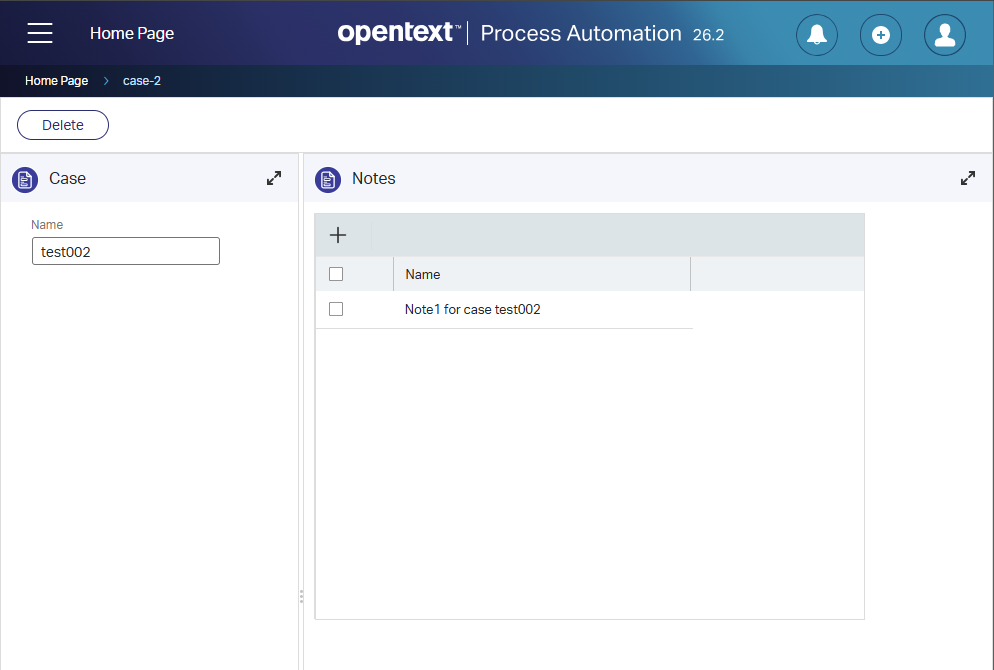
Pro tip: always use a “singular noun” for an entity name! So, it’s a ‘Note’ entity; NOT a ‘Notes’ entity. However, a ‘Note’ entity will have multiple ‘Note’ entity instances! It’s a small nuance, but a big difference in implementation separating you from the noobs vs. the experts (in my opinion!).
Why a ‘hasChild’ relation to ‘Note’ (with ‘hasParent’ to ‘Case’) and not a ‘toMany’ relation to ‘Note’ with a bidirectional ‘toOne’ relation to ‘Case’? Well spotted 🧐! We should have a free chat over MS Teams!
That could also work; HOWEVER, the hasChild relation lets you create new ‘Note’ instances directly in the form. For a ‘toMany’ relation, you first need to create a ‘Note’ instance (from a “notes” list) and select/relate it from the ‘Case’ instance! So, that’s a different kind of mindset you need to be aware of. As we’re on this track, keep in mind these two things: dropping a ‘hasChild’ relation on a form always shows a ‘Grid’ and NOT a repeating group AND that ‘hasChild’ relation does NOT have a counter for the number of items available (as that’s only an option for a repeating group!)…just that you know!
We’re getting off track…now from a ‘Case’ instance perspective, we want to know the number of notes where we have five different approaches (where you can already skip these three):
- Show a grid/table of the related ‘Note’ instances on a form in the ‘Case’ layout. Nice approach, but doesn’t work from a list if you don’t show it in a preview panel when selecting it. #BUSTED ✋
- Show a result panel on the ‘Case’ layout showing all the ‘Note’ instances and filter them out smartly with something like this:
case.Identity.Id={item.Identity.Id}. Again nice, but requires an extra relation from the ‘Note’ entity to the parent ‘Case’ (to build that filter) AND also requires a preview panel from the list view when you select an instance. #BUSTED ✋ - Create an ‘onCreate’ rule on the ‘Note’ entity and update a property (
case_no_of_notes) on the parent ‘Case’ entity by adding+1! Oh boy…Never, ever do this! This introduces an unreliable property on the case; what needs to happen when a ‘Note’ instance is removed? Another ‘onDelete’ rule doing-1…No, no, no! #BUSTED ✋. Always calculate live on the size of the array/list!
Then we’re left with two other approaches. This first one (which is a nasty workaround in my opinion) looks like this:
Create a functional ‘Rule’ BB on the parent ‘Case’ entity with an ‘onRelationChange’ event on the ‘Note’ relation. This will still set a parent ‘Integer’ type of property (case_no_of_notes) with a value like this: (item.note[].Properties.note_name).size()…AHA! This is much smarter as every time a ‘Note’ instance is created, the relation changes on the parent entity, which fires this rule to grab the size of the current notes. It eventually saves the size onto the parent entity property. This works greatly and is currently the way to go!
However, can we do better? Can we do it without an extra property to keep track of the number of related ‘Note’ instances? Well, YES and NO!
The parent entity ‘Case’ has a ‘Title’ BB…What if we add this expression as a title implementation:
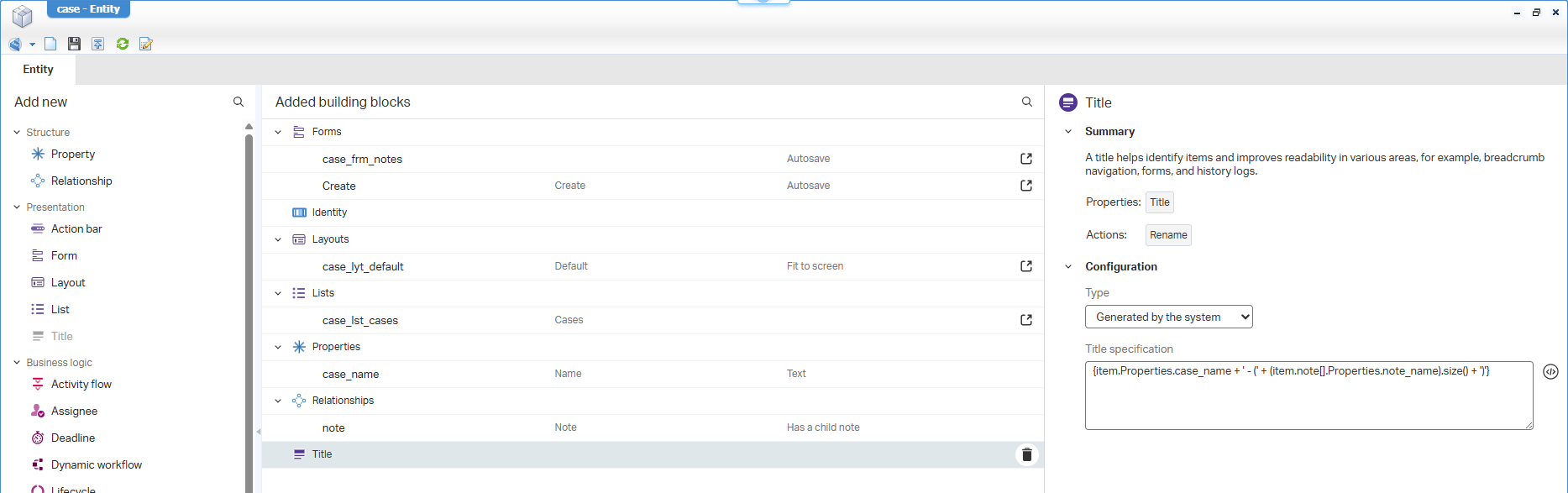
For you to copy:
{item.Properties.case_name + ' - (' + (item.note[].Properties.note_name).size() + ')'}
In runtime this will show up like this:
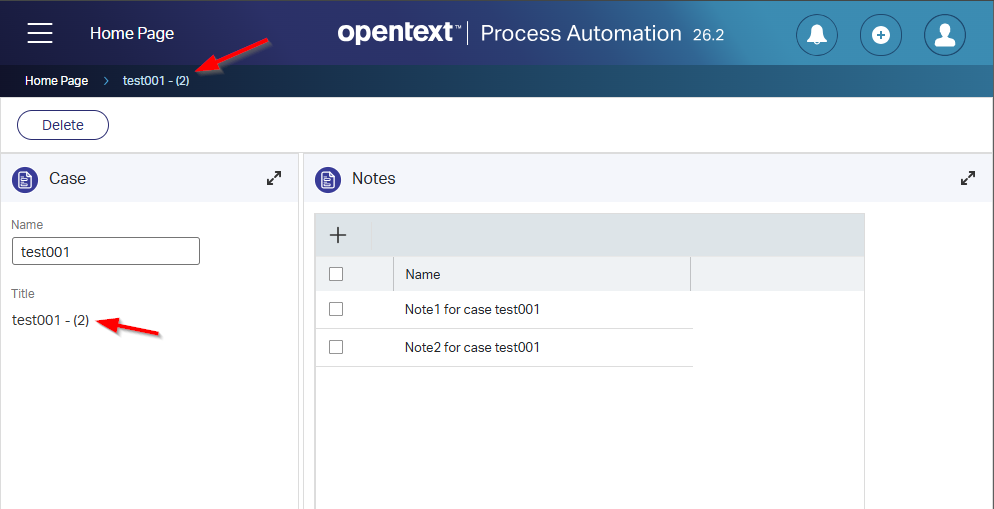
Much nicer AND not saving any “calculated” value, but it’s on the ‘Title’ BB which is implemented for a different purpose (to easily identify items)! So, what we miss (in my opinion) is some kind of “calculated property” that behaves like the ‘Title’ BB, but is implemented like the ‘Property’…So, a “Calculated property” which you still give the name case_no_of_notes, but you directly set it with an expression value. It’s also only for viewing/using a live calculated value in runtime (on your form/list or maybe use it in ‘Rule’ expressions too…or in a BPM messagemap XPath!?).
Finally, some wise words from the professionals: Updating things on an entity should always happen in context of the entity; that’s key!
That’s a future “DONE” and hopefully the development team behind the OPA platform gets enthusiastic enough to implement it as a solid new feature request. Let’s see when it’s available for a first try-out; it has my full attention and support. All my input is given; it’s now time to sit and wait for the outcome…I’ll update you; have a great weekend, and CU on another great post about “Process Automation Tips”, next week!
Don’t forget to subscribe to get updates on the activities happening on this site. Have you noticed the quiz where you can find out if you are also “The Process Automation guy”?
