


Hi there “Process Automation” fans,
Welcome to a new installment of “Process Automation” tips.
For this week, another tool is on the plan. We used the tool before (with a slightly different call), but not with the mindset below. How did I get to this tool? Well, I was cleaning some organizations for a customer and one was failing with a suggestion to first remove the workspace with the tool name ‘CWSWorkspaceRemovalTool’; interesting, as the last time I checked, this is a “deprecated” tool!
I did post about the tool named ‘organizationremovaltool’, but before running it, I would first run these steps for that specific organization:
- Remove all service groups/containers (by hand or automatically via CLI)
- Remove the workspace (like below)
- Remove the organization with the ‘organizationremovaltool’
Let’s get right into it…
Start your OPA VM (incl. the TomEE boot-up) and make sure you have a workspace ws_opa_tips_test with the corresponding project prj_general in it (not connected to any SCM like SVN/Git). There is also no need to craft any magic solution for this post.
…
If you’re a CLI-person AND have SVN/Git available, you can even create this (on RHEL) with a call like this:
1 | cd /opt/opentext/ProcessAutomation/defaultInst/bin |
You need to set this environment variable to make that last command fly:
export CORDYS_HOME=/opt/opentext/ProcessAutomation/defaultInst
And YES, the ./cws.sh call can also have a parameter removeworkspace(s), but that’s for later…
FYI: Creation of a workspace WITHOUT SVN/Git is only possible from the UI; well, there is a SOAP call createWorkspace; however, that’s a far too complex call to make for the time being!
…
Ok, back to our tool CWSWorkspaceRemovalTool for this post! How do we run it? Well, as simple as this:sh /opt/opentext/ProcessAutomation/defaultInst/components/cws/scripts/linux/CWSWorkspaceRemovalTool.sh
With a result like this (incl. a caution note on deprecation…aha!):
1 | ***************************** CAUTION ***************************** |
So, this would be a full command example (which we do NOT run):sh /opt/opentext/ProcessAutomation/defaultInst/components/cws/scripts/linux/CWSWorkspaceRemovalTool.sh opa_tips -psl -staging -care -development
After this, you also need to run a synchronizer for your workspace (which we also do NOT run) to finish the job:sh /opt/opentext/ProcessAutomation/defaultInst/components/cws/scripts/linux/CWSSynchronizer.sh opa_tips ws_opa_tips_test
Notes on those different “Spaces”; so, what are these spaces exactly!?:
-psl; stands for Published Source Layer and makes sure you get a graphical representation of a BPM to check on its progress from the PIM artifact.-staging; is a pre-deployment/staging stage where you can manipulate, for example, calendars and schedules before you finally deploy them into runtime. It’s part of the CAP packaging options! However, I always advise just using regular packages.-care; stands for CWS At Runtime Environment. So, that’s cleaning up runtime deliveries!-development; these are your workspaces in the organization.
While playing around, I also saw this error passing by again:
no eib4java in java.library.path. You can solve it viaexport LD_LIBRARY_PATH=$LD_LIBRARY_PATH:/opt/opentext/ProcessAutomation/defaultInst/lib/
…
Interesting R&D, but we move on to the correct cws.sh call to remove our SINGLE workspace:
1 | cd /opt/opentext/ProcessAutomation/defaultInst/bin |
Ok, works like a charm! 🤗
Note that there is a difference between multiple
removeworkspacesand a singleremoveworkspace!
Now watch this call and see who’s back: ./cws.sh help removeworkspaces
Yes, there are all our parameters (-psl -staging -care -development) again!? Ok, but is this tool not just calling CWSWorkspaceRemovalTool.sh?? Well, not directly! This is what happens in the background at the Java level (both in the JAR ./components/cws/cws.jar):
CWSWorkspaceRemovalTool.shcallscom.cordys.cws.client.CWSWorkspacesRemovalToolwhich starts a ‘CommandLineHelper’ to eventually start an ‘OperationRunner’ which executes the chosen operation in the CWS with corresponding client classes.cws.shcallscom.cordys.cws.cli.CWSCliwhich creates instances in CWS, runs a StandaloneApplicationTransaction, builds a ‘SubCommand’, and eventually executes it with the same classes under theclient.RemoveWorkspacepackage/class! So, I have a feeling this is an extra wrapper around the original toolset with more tracking and transaction feedback. Let’s leave it with this final thought…
Let’s do a run:
1 | ./cws.sh removeworkspaces -o opa_tips -care -development -psl -staging |
Important to know: I did create a quick entity with instances in runtime to see if this would be removed too!? The answer is NOPE! This is also something that I expected, as entity instance data is customer data that we should handle with “CARE”! 🤔
…
Now it also starts to fall into place on all the “spaces”! Have a look with the cmc.sh tool:
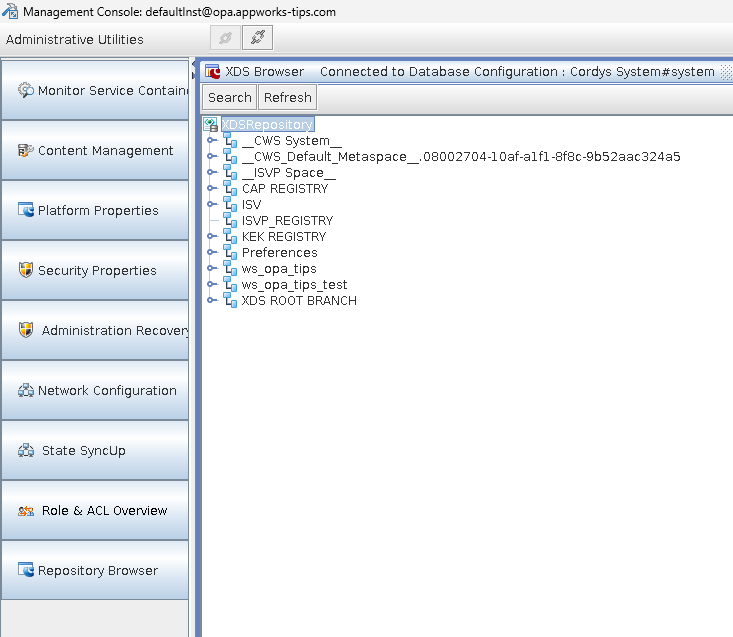
Here you only see my
-developmentspaces which are my workspaces!
This is a customer example with more data:
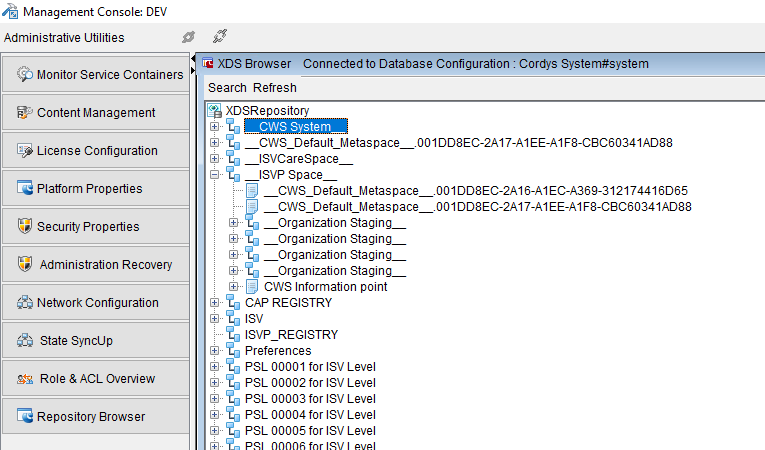
Here you clearly see multiple
-pslspaces, a-carespace, and the-stagingspaces!
Good to know: these are screenshots from the XDS browser, which is eventually just a view around a set of database tables. Read all about the XDS tables here. So, in the end, the tooling is nicely cleaning up our database tables!
If you get wet dreams of these “spaces”, have a look in this package com.cordys.cws.runtime.types.workspace where it all comes alive! 🤓
That’s a “DONE” for this post with interesting CLI insight again for automating your flow of work. Doing things manually is soooooo 80s; stop it and automate it. To this day, I still see too many manual activities happening between environments!? Why? Is it the lack of time? The lack of knowledge? Let me know in the comments. Have a great automation weekend and we’ll pick up another topic from the large backlog of items behind “Process Automation Tips”.
Don’t forget to subscribe to get updates on the activities happening on this site. Have you noticed the quiz where you can find out if you are also “The Process Automation guy”?
