


Hi there “Process Automation” fans,
Welcome to a new installment of “Process Automation” tips.
A new GA OPA platform version 25.3 is available for this new quarter (Q3 2025). We’ll update you in this post about the new features for this release! Again, no fresh installation; I’ll do a quick upgrade from my previous 25.2 VM (which was already an upgrade from 25.1)…
Let’s get right into it…
I’ll follow my own upgrade post for quick insights and because it simply takes less of my valuable time. I’ll upgrade from version 25.2, upgrade CARS to version 2.8.11, and I leave the OTDS instance 24.4.0 as is; Although there is an OTDS upgrade package to version 25.2.0, I see that the supported version still is OTDS 24.4.0. This post reviews the OpenText Process Automation CE 25.3 Release Notes PDF. I’ll jump through each feature one by one in the following sections.
This is the quick tag on the support site: #ProcessAutomation25.3!
🆕 Update on the available changes in 25.3 🆕
Ohw boy what a release…I did a quick sneak-peak, and it’s interesting to see how the platform slowly moves to a mature platform with great support for technologies we all use these days. Don’t sit and wait…Install it yourself, eXperience it, and see what’s new…
Developer Aviator enhancements
Hopefully, you already know how start with the Aviator in context of OPA; Otherwise, read about it here to get a head-start.
This feature integrates Aviator with Core Content (as documentstore location!):
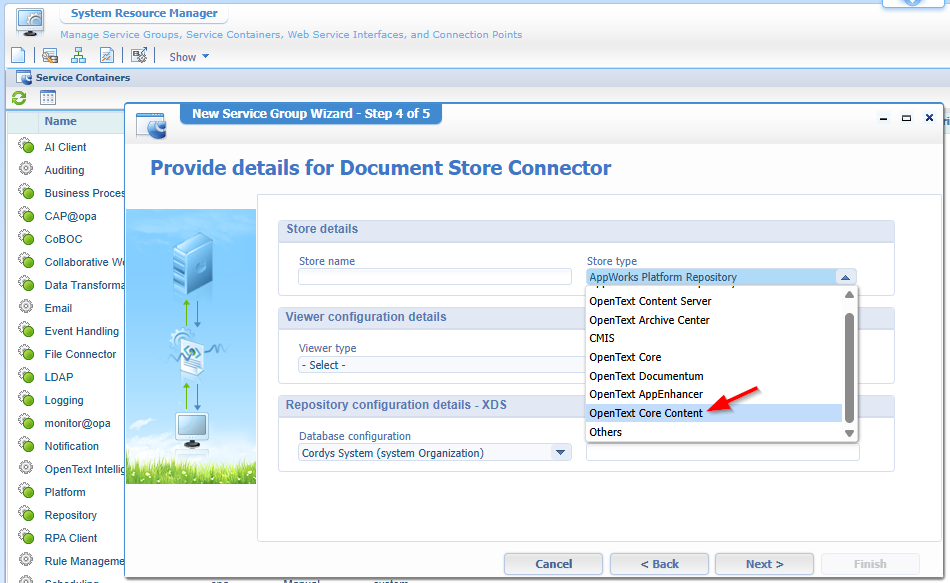
Now we only have a problem, as I have an endless thread with OpenText PS about bringing alive this storage location (with tenants, licenses, proxy URLs, regions, geolocations, etc.)…So far, no white smoke nor green flags! So, if you’re the one using it…Let me know as we can share some knowledge!
So, we need to trust OpenText on their blue eyes this feature works as describes generating OPA applications with integration of “Core Content for document management”.
Bitbucket for Source Control Management
Great! Only less great because it’s only supported in the new dev eXperience. That’s an interesting move, but also smart promoting to start using and embracing the new /dev layer of the platform. Tell me truly; Do you already use it? Have a comment at the end of this post!
I tune in to the new “citizen” development eXperience to create a new workspace with this SCM input:
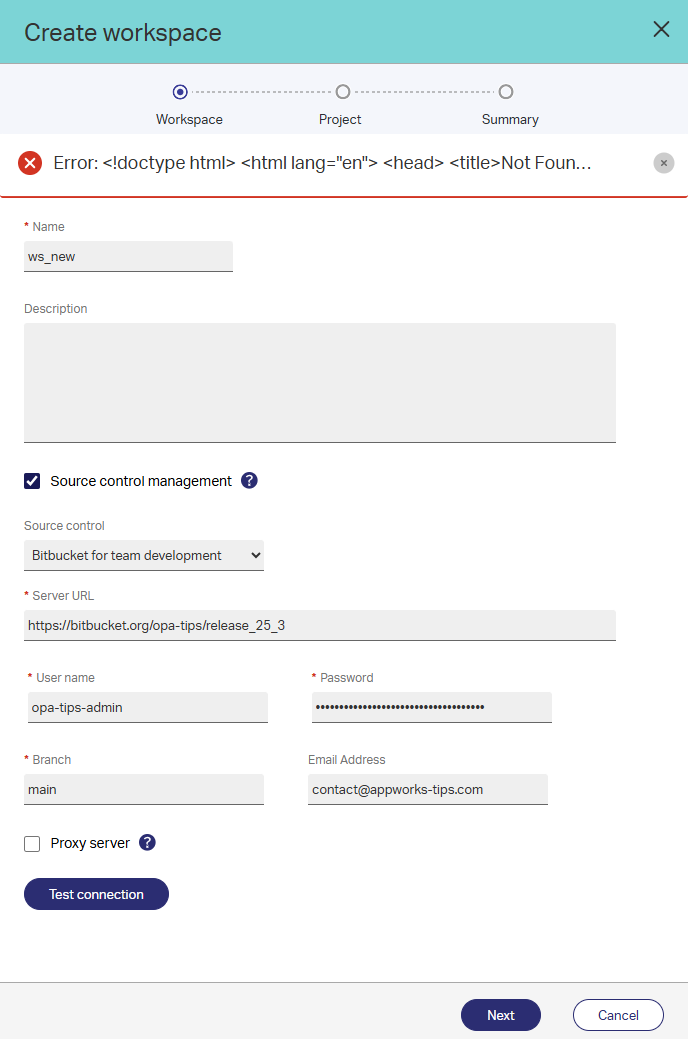
You see I get an error, but that’s because I hardly conclude (see below) Bitbucket cloud isn’t supporting Large File Storage locking. So, I need to give up as I don’t have Bitbucket server on-prem available! 😢
…
These are my finding on a too long R&D session where valuable lessons are learned!
You can get a free bitbucket account here or host one your own (which is the better choice)! Mine is in the cloud with a repository like this:
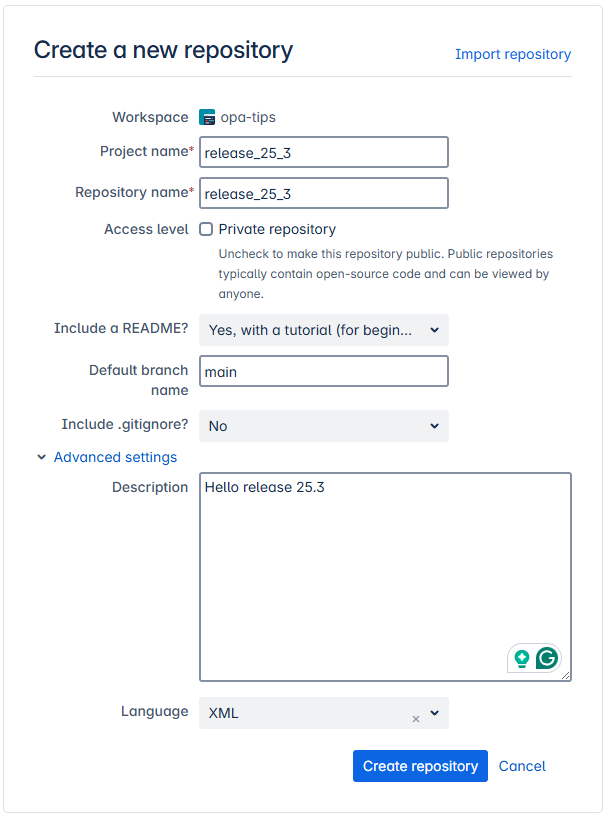
Extra notes:
- You can find your Bitbucket username here
- I also create an app-password (Creation is discontinued on September 9, 2025, but you can use them till June 9, 2026!) which I use as password!
My first ‘Test connection’ attempt gave an error (credential-wise we’re at least correct!): at com.cordys.cws.runtime.types.teamdevelopment.gitadapter.action.lock.GitLockRESTHandler.isLFSEnabled(GitLockRESTHandler.java:90) (in JAR-file %CORDYS_HOME%\components\cws\lib\cordys.cws.gitadapter.jar; for your/mine remote debugging!). This rings a bell! AND brings me to this manual like we also saw for GitHub once before ending with a call like this: git lfs track "*.*" creating a .gitattributes that must be available in the remote repository.
All the other tries failed as well and after a quick remote debugging session, I see a request to this URL: https://bitbucket.org/opa-tips/release_25_3.git/info/lfs/locks! Only, this ReST API end-point is NOT supported in the cloud

Data encryption of entity properties
We double-checked this feature already in a “preview” release in 25.2 (here)
The great question: Is it improved?
Well, I don’t know…It still feels the same after a similar implementation with just an entity, this encrypted ‘Password’ property, and some “decrypt” in the ‘Security’ BB. I even found a reproducible bug:
- Fill in the encryption field in the runtime UI
- Get to a second field
- Get back into the encryption field
- Hit the
<Ctrl>-key (or the<Alt>/<Shift>) and the field is empty again!?
Weird stuff going on for this field; It’s not only Chrome; Edge behaves the same. And one time I even saw the real data passing by. #SUPPORT
Save emails and attachments in BWS
It’s this option which is only available with the ‘Business workspace’ BB applied to the entity:
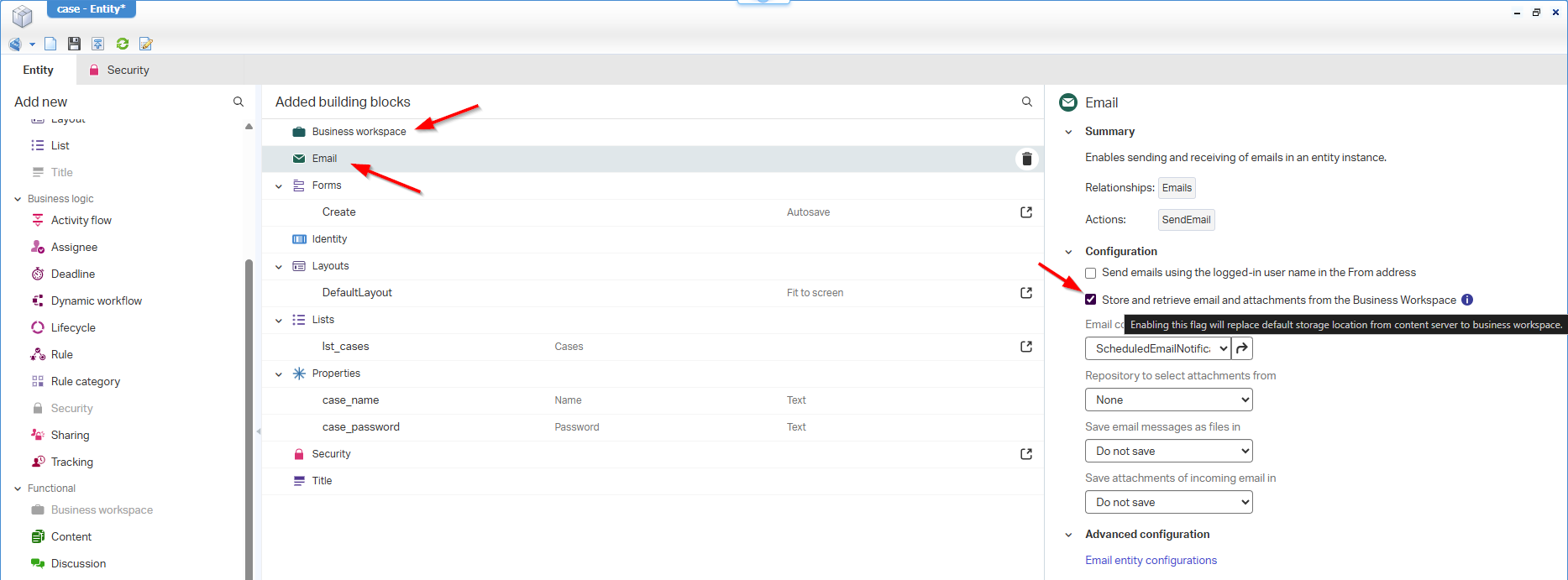
I don’t have any xECM up and running to try it out, but I know customers where this option will have an impact!
This is a copy from the documentation of the section “Providing email functionality”:
1 | Add a Business workspace building block to the entity. |
New Rule features and enhancements
For this feature, we find two interesting sub-features…
Refresh runtime when long-lived business process model execution is complete
When you fire a long-lived process (which is stateful and a-synchronized like in “fire and forget”) from a rule, your end-users will never get a notification and the only thing they can do is hope & pray the advanced logic did the magic. The only way is verifying yourself with a refresh (if the data in the UI is visible) or check the PIM on a valid outcome…Can we do the better? Yes, with a magic flag:
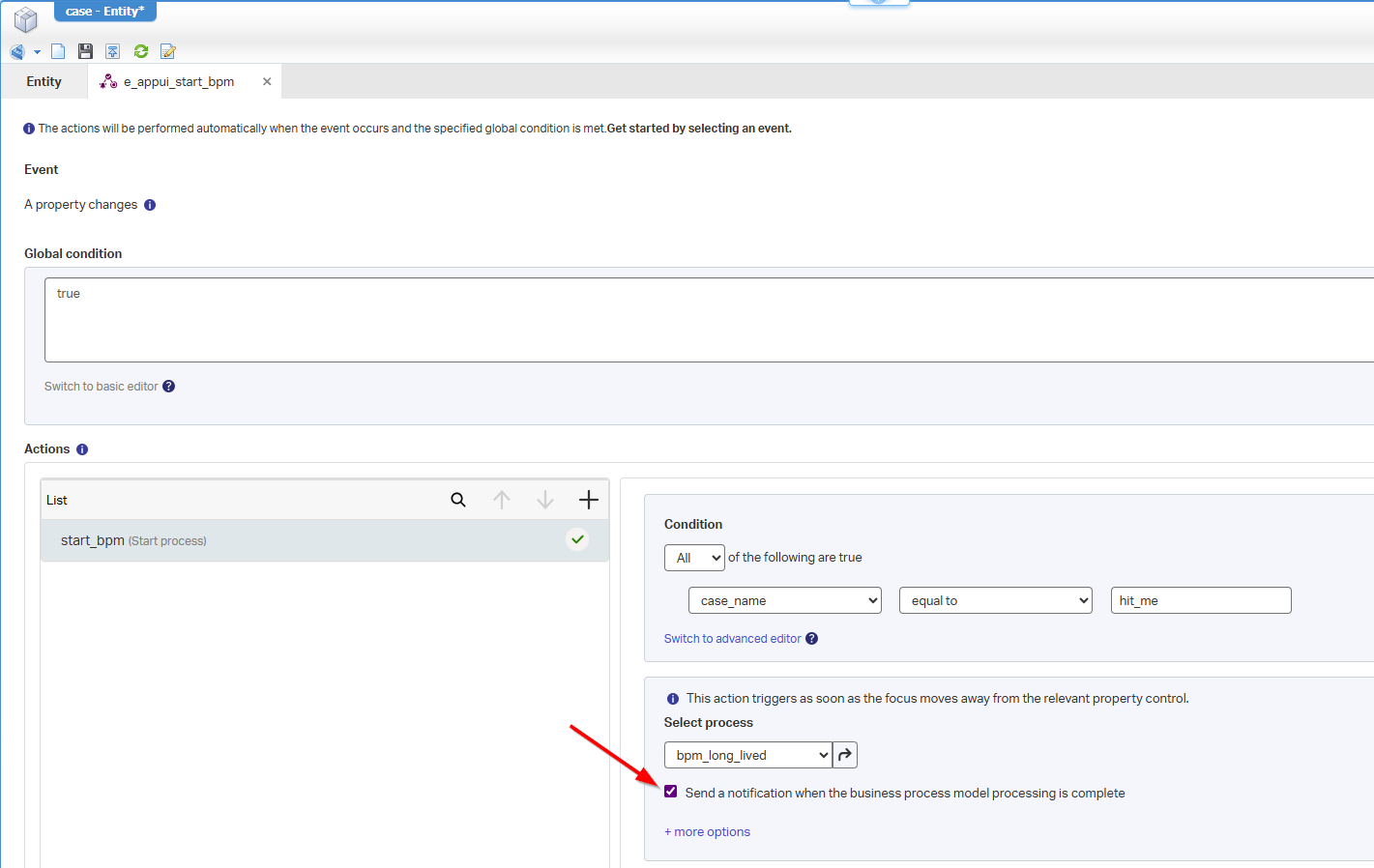
After publication, it will look like this in runtime:
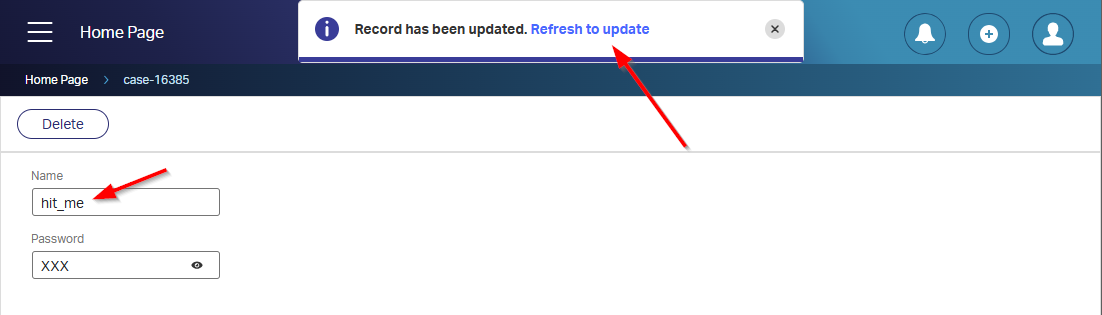
NICEEEE! Time for Q&A:
- How about a short-lived BPM? Well, that one will already directly update the UI seamlessly (because of the synchronized BPM call)!
- Does this also work for the functional events starting a long-lived process? Well, the option is NOT available! So, you don’t get the popup…BUT when you make it a short-lived BPM I can remember the UI updates itself too (again because of a synchronized call!). I just tried and indeed that’s a correct assumption…Fascinating, and understandable!
Page re-direction as multiple rule actions
Do I read this correctly in the release notes Add page redirection multiple times within multiple actions!? Well, if only one of the actions trigger it smells like a routing mechanism, but what if multiple actions are conditional wise valid? What will happen then? Redirect over redirect? Or does the last redirect comply? It’s always good to ask yourself these “reverse”-engineering questions…Ohw, and does it also forward on our long-lived BPM after our refresh-notification? 🤔 Only one way to find out…
Create a new ‘Rule’ BB of type ‘Custom action’ and do something like this:
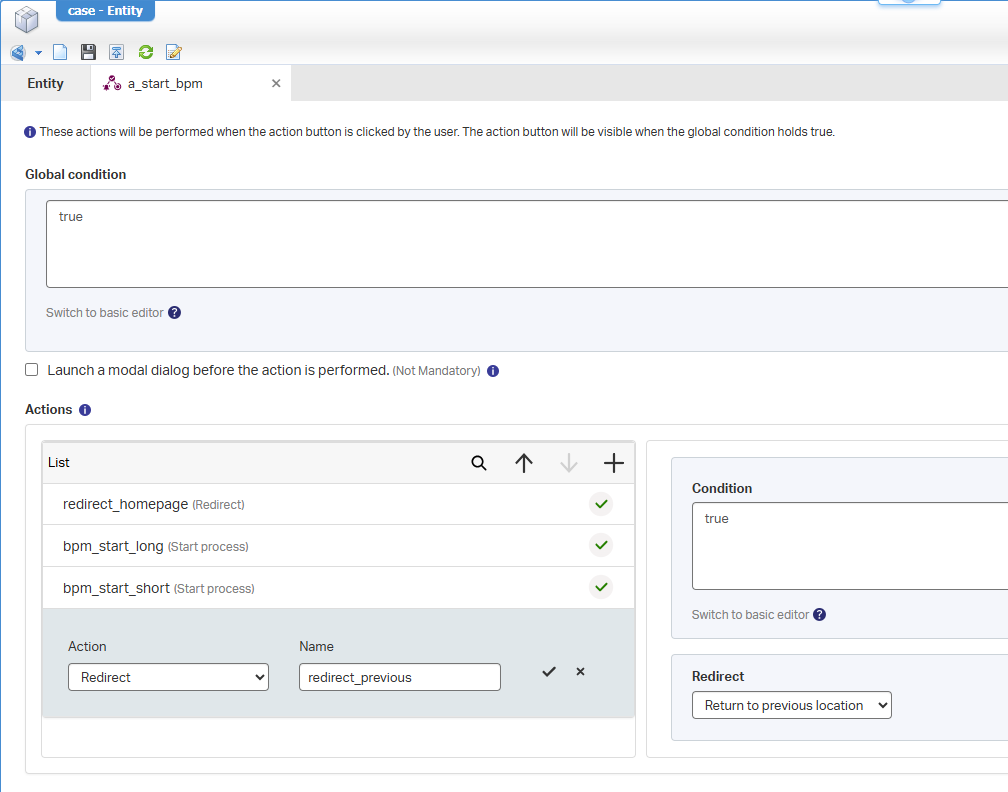
These are the actions (all with a true condition)
- Redirects to the homepage
- Starts our long-lived BPM with new notification option enabled
- Starts our short-lived BPM with direct update in the UI
- Redirects to the previous location
Now you guess what will happen when we hit our custom button from the action bar in our ‘Case’ entity instance? It will only redirect to the homepage and the rest skips! Aha-moment, but that makes it a routing mechanism with if-else statements where you can move to a certain direction based on conditions!
What will happen when we disable the first action with a false condition? Well, it will indeed execute both the BPM actions, and will redirect to the previous page…And the “refresh”-notification? Yes, that one passes by as you’re not in the context of the case anymore! ✅
Dynamic workflow tasks groups and roles are separated
Tell me; Do you use the ‘Dynamic workflow’ building block already in production? Apparently, I’m one of the dis-believers for the valuability on this BB. Trust me, I want to embrace it, but I don’t see it happening; Business-users creating their own flows in runtime, end-users instantiating them without creating a mess over-time? Maybe it’s just me, let me know in the comments or contact me; I love to hear your story.
For this release (in the meantime my VM got a reboot), we have a small enhancement in the BB in runtime splitting up the role/group assignment (earlier groups where visible in the role-section!):
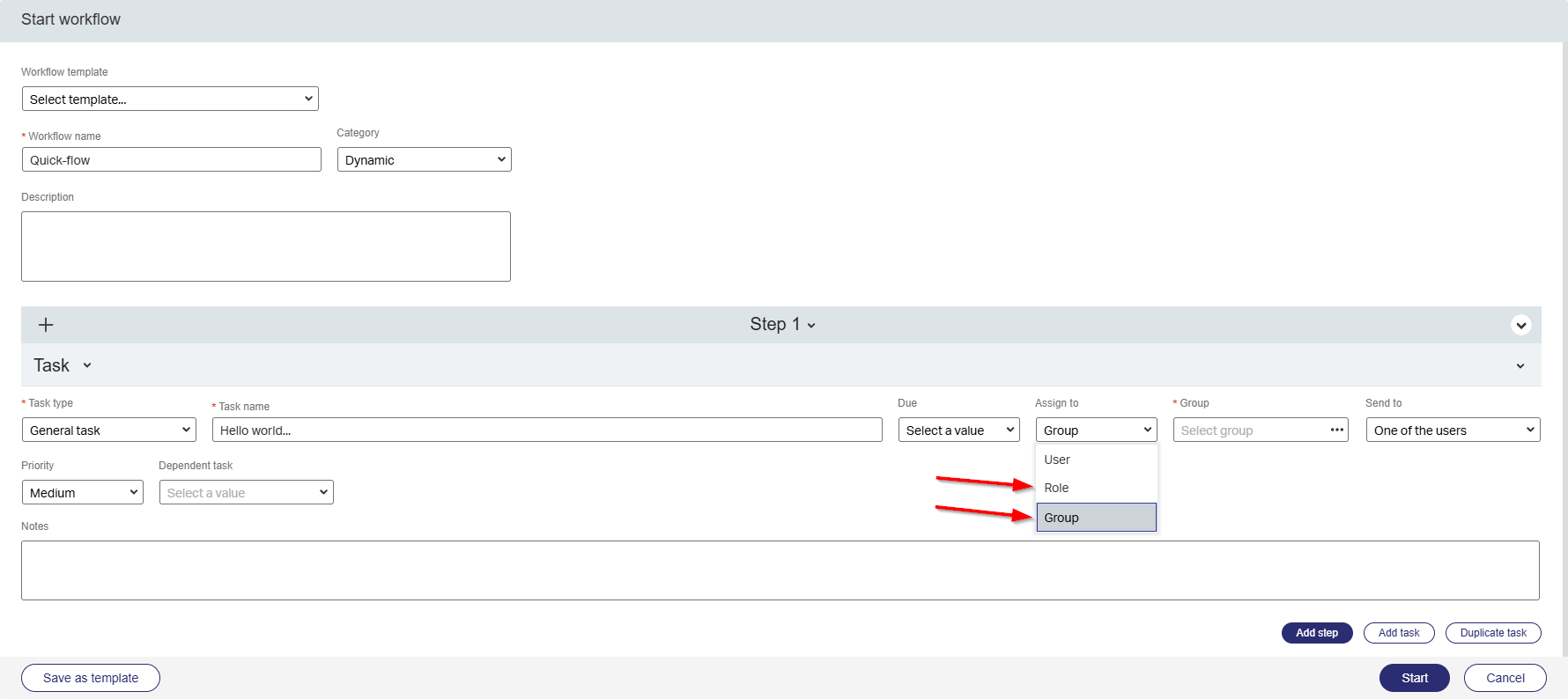
Follow these steps to make it happen in design-time:
- Create an entity.
- Add the ‘Dynamic workflow’ building block.
- On the layout, add the ‘Workflow Instances’ panel and the ‘Progress Bar’ panel with dynamic workflow selection!
- Have the ‘Developer’ role applied to your account or the specific internal role ‘Workflow Template Developer’.
- Do a publication, create an instance of the entity, and play with the workflow options.
…
Now for the great question! Where are those groups coming from? As in OPA itself, we can only create and push/consolidate roles!? Great question and a simple answer! That’s OTDS configuration. So, if you directly create a group in OTDS it will become an “identity” group in OPA runtime! The only strange thing is, when you push OPA roles to OTDS, they will be shown under the ‘Groups’ tab of ‘Users & Groups’. So, the “groups” in OTDS will, after consolidation, be a group (when created in OTDS) in OPA, or be a role (when pushed from OPA) in OPA. Yes…Read that sentence again! 🙃
Rest Gateway connector
Finally, it comes with a praise (😇)! I communicated about the support of OpenText on this connector already since version 24.3 and version 24.4. Read here about its power and see why it’s an important connector including the support by OpenText. So, you don’t need to install it yourself…It’s installed out of the box for you!…The only thing you need to do is deploying the available CAP file from the ‘Application Deployer’ artifact in ‘/system’ into the ‘Shared’ space to make these artifacts available:

Discontinued and deprecated features
It starts to look like a new streak (🔥🔥) on NO discontinued and deprecated features! Version 25.1 was the last one about TomEE 9.x support.
The playground for OpenText™ Process Automation 25.3 is open again; It’s a “DONE” on the features for this release, and it’s up to you to further consume it for this Q3 2025 release. Have a great weekend, and we see each other next week, with a brand-new “Process Automation Tips” post.
Don’t forget to subscribe to get updates on the activities happening on this site. Have you noticed the quiz where you find out if you are also “The Process Automation guy”?
